
When voice actually works in an app, and when it doesn't
An honest framework for deciding which tasks belong to a spoken path, which belong to text, and which should stay on the screen.
About this article
A spoken path wins when the task fits in one sentence the user already knows how to say and the user is somewhere they can speak. It loses on browsing, comparison and exact data entry. Most apps have a handful of tasks in the first category and a great many in the second, and the useful work is telling them apart.
We sell an SDK for building in-app agents, so read the following with that in mind. Voice is the wrong mode for most of what your app does, and the teams that ship it well are the ones that work out which few things it is right for before writing any code.
This is the mode question. Whether you want an agent in the app at all is a separate one, and answering it yes does not commit you to a microphone.
Two questions settle it for a given task. Does the task fit in one sentence the user already knows how to say? And is the user somewhere they can say it? Both have to be yes. Only the first is about your product.
What the existing research says people use assistants for#
The most useful study here predates the current generation of models and holds up anyway. Nielsen Norman Group ran a critical-incident study of 211 daily users of Siri, Google Assistant and Alexa in 2018. People reported using them for fact lookups, weather, navigation, music and timers. Only 26 percent had used an assistant for a task with multiple steps.
Failures clustered somewhere specific and worth remembering: slight variations on a request that normally works. Asking for the weather succeeds; asking for the weather in London in the autumn failed on two of the three systems tested.
An in-app agent is a different object from those assistants in three ways. The task space is bounded by one application, so the model chooses among your tools rather than among everything a person might want. The user is signed in, so the agent can act rather than describe. And there is a screen, so an answer can be drawn and checked rather than only spoken.
Those differences are real and they are not a licence to ignore the finding. If your design depends on a user saying three clauses in one breath, the 2018 data is telling you something the 2026 model will not fix.
The four conditions#
Kathryn Whitenton’s earlier NN/g piece on voice interaction makes the point that voice-only interfaces trade recognition for recall: without a display, the user has to hold the options in working memory. Her worked example is adding five items to a shopping list, which is tedious spoken and trivial typed.
That is one of four conditions worth checking per task.
Hands occupied is the strongest case and the rarest. A driver, a warehouse picker, someone cooking with a phone on the counter: for them speech is not faster, it is the only channel available.
Eyes occupied is adjacent and stricter. If the user cannot look at the screen, every part of your answer has to survive being spoken, including the parts you were planning to put in a chart.
Other people can hear is the condition that kills more deployments than any other. Nobody says their account balance out loud on a train. The fix is a text field into the same agent. It costs almost nothing, no amount of visual design substitutes for it, and it is routinely left out.
Exactness is where speech simply loses. Sixteen digits, a postcode, a part number: the user has to verify each character anyway, so dictation adds a step rather than removing one.
Where it genuinely wins#
The pattern that works is a bounded, repeated action against state the app already holds. Reordering the thing bought last week. Checking whether a specific payment cleared. Moving a delivery to Thursday. Filing an expense with a photo already taken.
These share a shape. The user knows exactly what they want, the app knows who they are, and the only hard part has been finding the screen. That is the problem a spoken request removes.
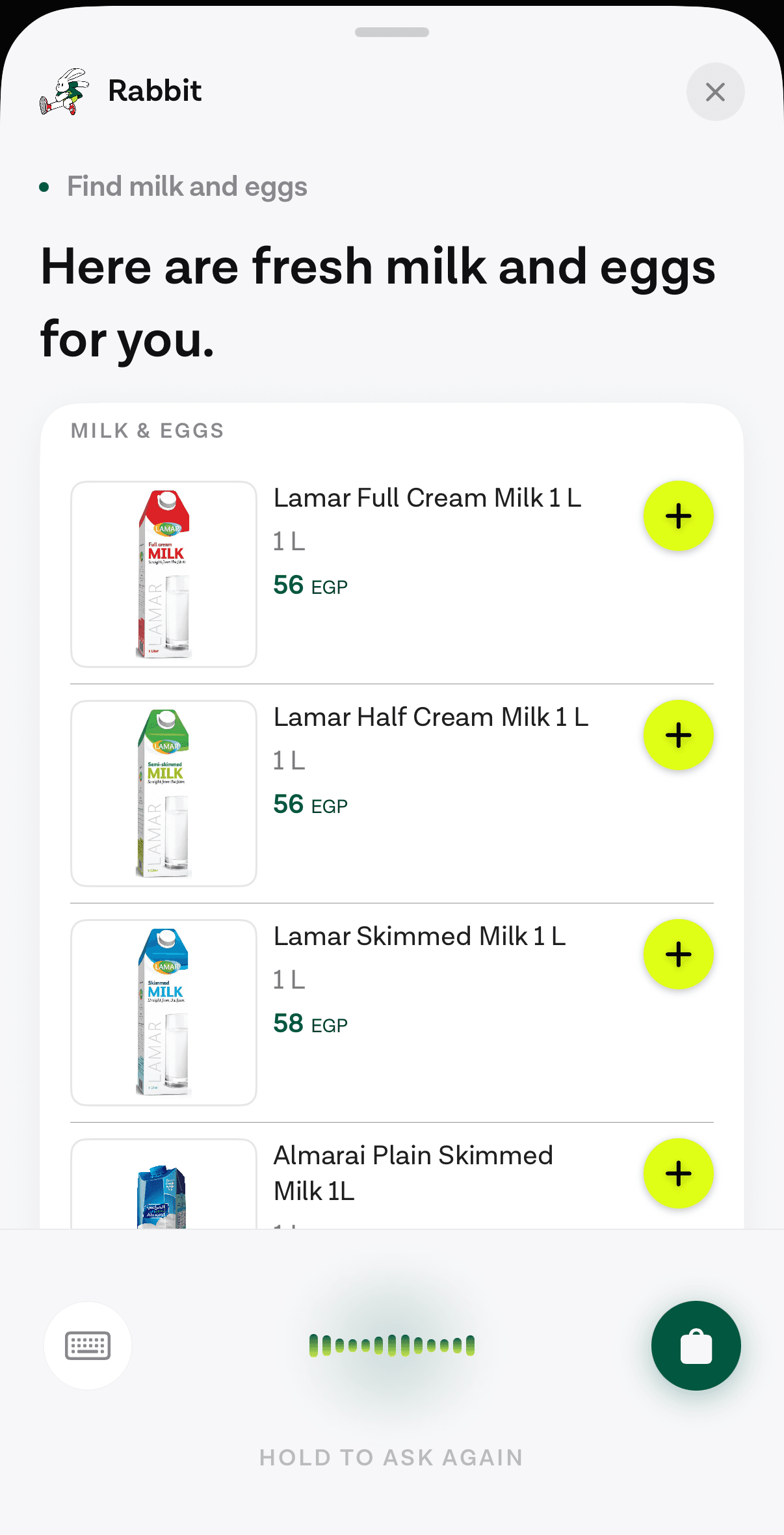
Note what that screen does. The request arrives by voice and the answer arrives as touchable UI. The user is not asked to remember six products and pick one from memory, which is precisely the failure Whitenton describes. The spoken channel handles the intent, and the screen handles the choosing.
The latency question, against the bar conversation sets#
Conversation has a rhythm and it is tight. Stivers and colleagues measured turn-taking across ten languages on five continents and found a modal gap between turns of 0 milliseconds, with medians between 0 and 300 milliseconds and a cross-linguistic median around 100. That is the bar human conversation sets, and no current assistant stack meets it.
Jakob Nielsen’s response-time limits are the useful engineering targets instead: 0.1 seconds feels instantaneous, 1 second keeps the user’s flow of thought, and 10 seconds is the limit of held attention.
Our own numbers sit between those. A warm turn through our stack runs about 2.5 to 3 seconds end to end. A cold one is worse, sometimes much worse, and the dominant cost is the tenant’s own backend rather than anything in the agent loop. We have retired the sub-one-second claim that used to appear on this site, because it was not true of our stack and is not true of anyone’s for a turn that calls a real API.
Between one and three seconds you are in the territory where what you show matters more than what you shave. A visible state change at the moment speech ends, then the answer streaming as it arrives, reads as responsive. Three seconds of nothing reads as broken.
The objection worth taking seriously#
There is a good argument against all of this that has nothing to do with speech. When an interface is generated per request, people cannot learn it.
A Hacker News thread on generative UI puts it plainly. One commenter: “A chatbot should not be moving around the buttons. If I’m going to compare notes with my friend on how to use your software, all the buttons need to be in the same place.” Another raises documentation: how do you write instructions for something that looks different for every user.
Both are right, and the answer is to constrain what the agent can draw to a fixed catalogue of components your team designed and audited, so the answers vary while the vocabulary does not. The user learns a small set of cards once. Your support team documents that set. The agent picks among them.
How to decide, concretely#
List your top twenty tasks by volume. For each one, write the sentence a user would say to request it. If you cannot write that sentence in under twelve words without inventing vocabulary the user does not have, the task is not a candidate.
Of what survives, drop anything that requires exact input and anything users overwhelmingly do in public. Then check that what remains is actually painful today, because a two-tap task that already works does not need a second path.
You will usually be left with three to five tasks. That is the feature. Ship those, put a text field on the same agent, and leave the rest of your app alone.
Hands occupied and gloves on is the condition that shows up in one vertical more than any other, and a driver or a picker on a warehouse floor is where the test above passes without argument.
Adjacent reading, with the division stated so neither post duplicates the other. The accessibility case is about who the touch interface fails, and it is the one argument here that does not depend on the conversion maths. Older users specifically covers the cognitive load of navigation and the adoption data that complicates it. What typing costs is the input-speed evidence. How the pieces are configured covers what the SDK does once you have decided.
Sources#
- Whitenton, K., & Budiu, R. Intelligent Assistants Have Poor Usability: A User Study of Alexa, Google Assistant, and Siri, Nielsen Norman Group, 16 September 2018. 211 daily users. Accessed 12 September 2026.
- Whitenton, K. Voice Interaction UX: Brave New World…Same Old Story, Nielsen Norman Group, 31 January 2016. Qualitative. Accessed 12 September 2026.
- Stivers, T., et al. Universals and cultural variation in turn-taking in conversation, PNAS 106(26), 2009. Accessed 12 September 2026.
- Nielsen, J. Response Times: The 3 Important Limits, Nielsen Norman Group, 1 January 1993. Accessed 12 September 2026.
- Hacker News. Discussion: What Is Generative UI?. Accessed 12 September 2026.
Next
The reference for what this post describes.
Read the docsThe rest of Agent basics
Open the clusterThe structural difference between something that answers and something that finishes the task, and how to tell which one a vendor is selling you.
- What an in-app AI agent actually is, and what it can touchThree different things get called an AI agent in a mobile app. Here is the one that lives inside your product and acts through your own backend.11 min
- Voice or chat: picking the mode for the taskSpeaking and typing are two inputs to the same agent. The situation the user is in decides which one wins, and four of those situations are predictable.9 min
- Why pre-LLM assistants failed, and what changedAssistants before 2023 broke at the layer that turned words into actions. Three things replaced it: open intent, named tool calls, and a loop that checks first.10 min
- Agents in a shopping app: reorder, track, returnThe three retail tasks worth giving an agent, why reorder is first, and how to check whether your catalogue supports the case at all.7 min
- What an in-app agent SDK actually doesThe boundary between an agent SDK and your app, the five phases of a turn and what breaks in each, and why the write path is the part that decides the project.8 min
- In-app agents that finish the task instead of answeringAn assistant that describes where a setting lives competes with your own navigation. One that completes the request does not. What changed, and what to build.8 min
- Agent or chatbot: telling the two apart before you buyA support bot answers questions. An in-app agent finishes the task. Five questions that separate them in any vendor demo, and where a chatbot still wins.10 min
- Letting users reorder by voice in three tool callsRepeat purchase is the cheapest first agent feature to ship. Three tools carry it, only one of them writes, and a confirm card sits between the second and the third.6 min
- When not to put an AI agent in your appFour situations where an in-app agent loses to the interface you already have, and the test to run before you commit a quarter to building one.10 min
Elsewhere on the map
- Voice is an alternative input path, not a speed featureThe case for a spoken path into your app, argued from the curb-cut effect, WCAG 2.2 and what screen reader users actually report.Voice7 min
- Agent runtimes for mobile apps: an honest comparison (2026)OpenAI Realtime, LiveKit, ElevenLabs, Vapi and Retell compared on what a mobile team actually chooses between: layer coverage, client SDKs and the write path.Business8 min
- Designing an agent conversation people can actually useThe seven decisions that make or break a conversational feature: discoverability, endpointing, barge-in, errors, confirmation, latency and the visual answer.Voice11 min