
In-app agents that finish the task instead of answering
An assistant that describes where a setting lives competes with your own navigation. One that completes the request does not. What changed, and what to build.
About this article
An in-app agent earns its place when it completes the request instead of describing how to do it. That takes three things: a model that resolves messy intent into a tool call, a gate where the user approves anything that writes, and a way to draw the result as real product UI rather than a paragraph of text.
The part that used to break#
Voice and chat interfaces have been shipped inside consumer apps, quietly removed, and shipped again for something like fifteen years. The microphone was rarely the reason they came back out. The failure sat in the middle of the pipeline, where a sentence has to become a specific, executable request.
Older systems matched what the user said against a list of phrases somebody had written in advance. “Move two hundred to savings” worked. “Can you put two hundred into my savings, the one I opened last year” did not. Every team that tried it found the same wall: the set of sentences a person might say is not something you can enumerate, and an interface that fails on anything outside the list is an interface people stop opening.
Language models removed that constraint. A model takes an unfinished, accented, code-switched sentence and produces a structured call with named arguments. That capability is what makes the rest of this worth building, and it is recent enough that most product roadmaps were written before it existed.
An answer is not a result#
Most assistants shipped into consumer apps so far answer questions. A user asks how to change a delivery address and gets a correct, well-phrased description of where the setting lives. Then they go and do it.
That shape has a ceiling, because the assistant is competing with the app’s own navigation and navigation is usually faster. It gets interesting when the assistant can carry out the request: find the order, change the address, show what changed. The unit a user cares about is the finished task, and everything else is narration. What such an agent is allowed to touch is the question that follows immediately, because completing a request means calling something. The smallest version worth shipping is repeat purchase, which takes three tool calls.
The friction here has been measured, though not by us. Baymard Institute, averaging fifty separate studies of online checkout, documents cart abandonment at 70.22%. Among people who abandon during checkout for a reason other than browsing, 17% name a checkout that was too long or complicated and 18% name being asked to create an account. Those are interface costs rather than pricing ones, which is the category an in-app agent can act on. Whether it moves the number in your product is a question for your own funnel, and worth instrumenting before you believe the analogy.
What one turn actually looks like#
The app captures a sentence and hands it to the SDK together with the auth header it already holds for that user. The runtime resolves intent, decides which of your tools to call, and calls them against your own backend over MCP or plain HTTP, with the same auth, validation and rate limits those endpoints already enforce. One payload comes back. The app draws it. The tool seam is the subject of its own guide, because it is where most of the real work in an integration turns out to be.
Two properties of that path matter more than the boxes. The runtime never holds your service credentials; it carries the user’s, so an action that user could not perform through your own API is an action the agent cannot perform either. And the steps that leave your process are the ones that dominate the clock.
We have watched a turn that normally settles in a couple of seconds stretch to thirty because an upstream tool server was having a bad afternoon. The agent loop was not slower that day. Build your timing budget around the dependencies, and instrument each phase separately, or you will spend a week optimising the one part that was never the problem.
The interface problem, and the render spec#
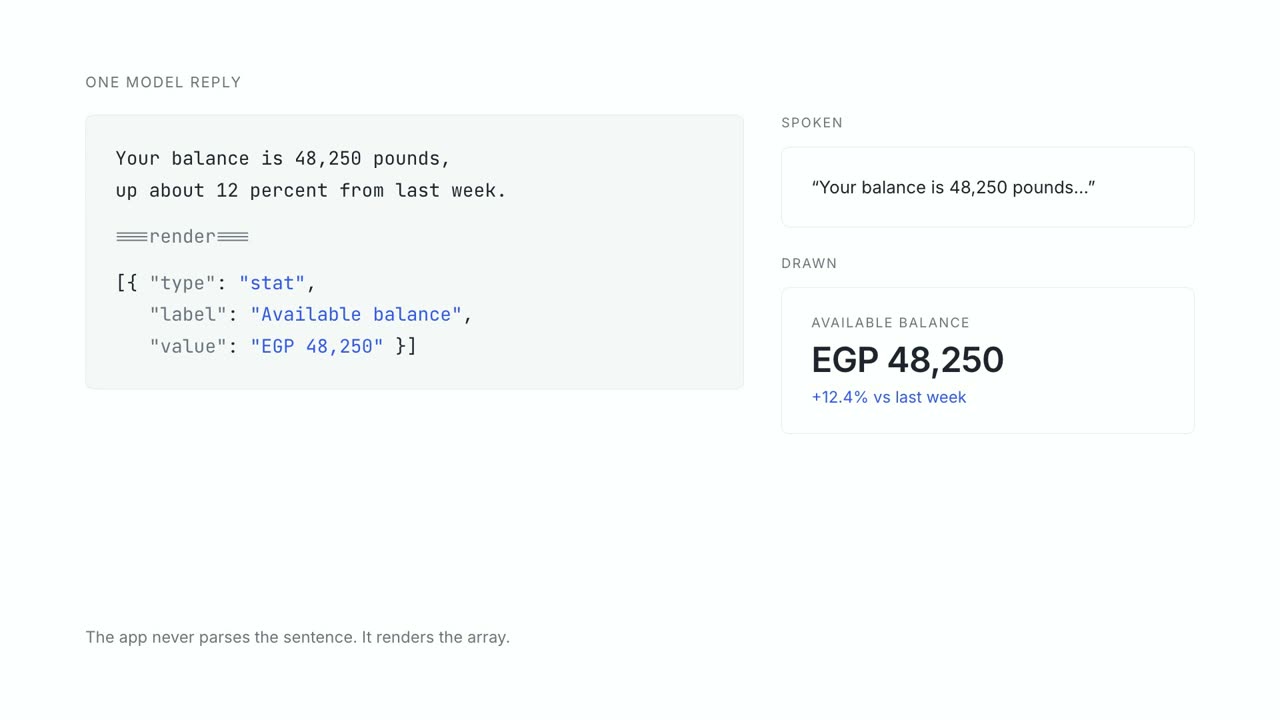
If the runtime stops at text, the app team still has the larger half of the job in front of them. Every answer with structure in it needs a view: a balance, a list of three options, something the user has to approve. Somebody designs and builds that view, on every platform the product ships on, and again when the answer changes shape.
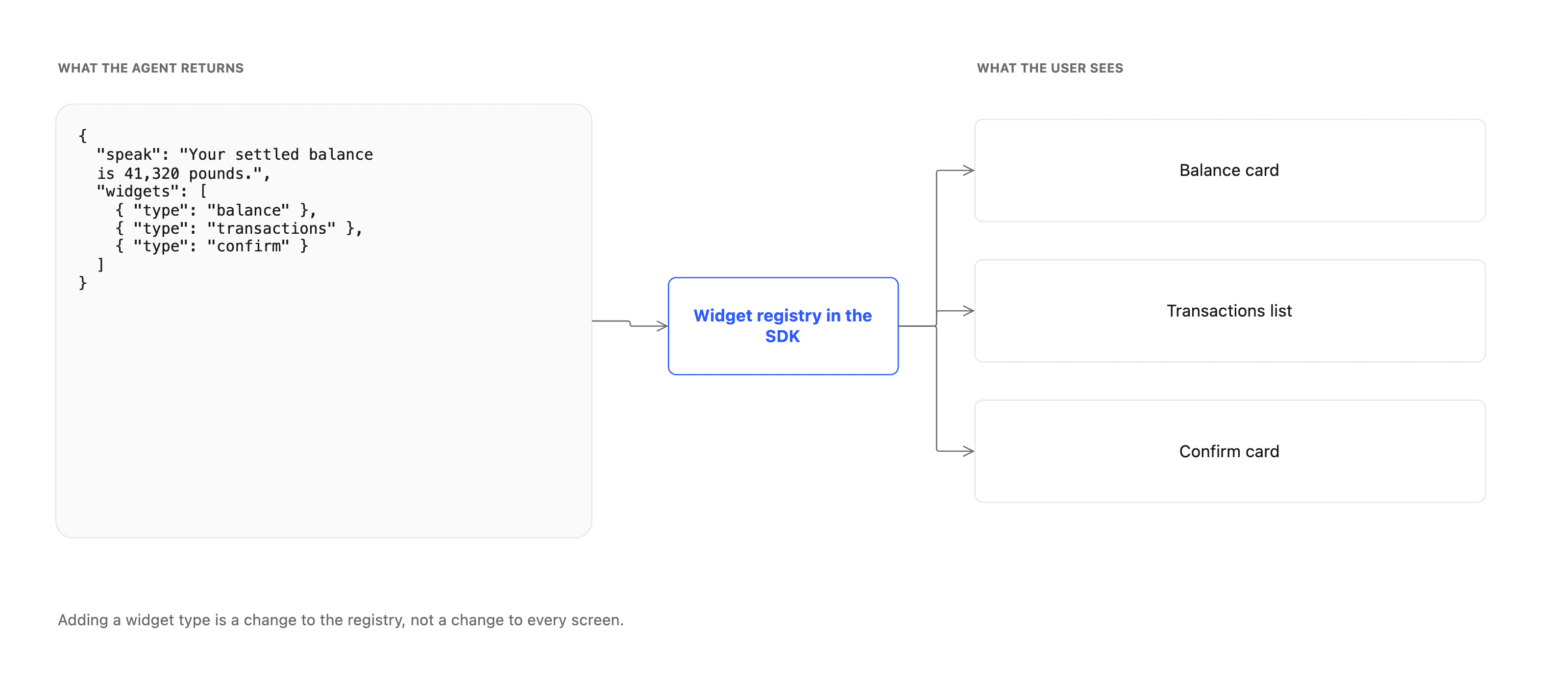
The render spec is the alternative. The agent returns the answer it will speak or show, then names the widgets the app should draw, as data.
{
  "speak": "Your settled balance is 41,320 pounds.",
  "widgets": [
    { "type": "balance" },
    { "type": "transactions" },
    { "type": "confirm" }
  ]
}
Your app registers what each widget type means once. Adding a type is a change in the registry rather than a change in every screen that might show it, and the widgets are your own components, so they inherit your typography, your spacing and your brand without a theming layer in between. The widget catalogue lists every kind the agent can ask for.
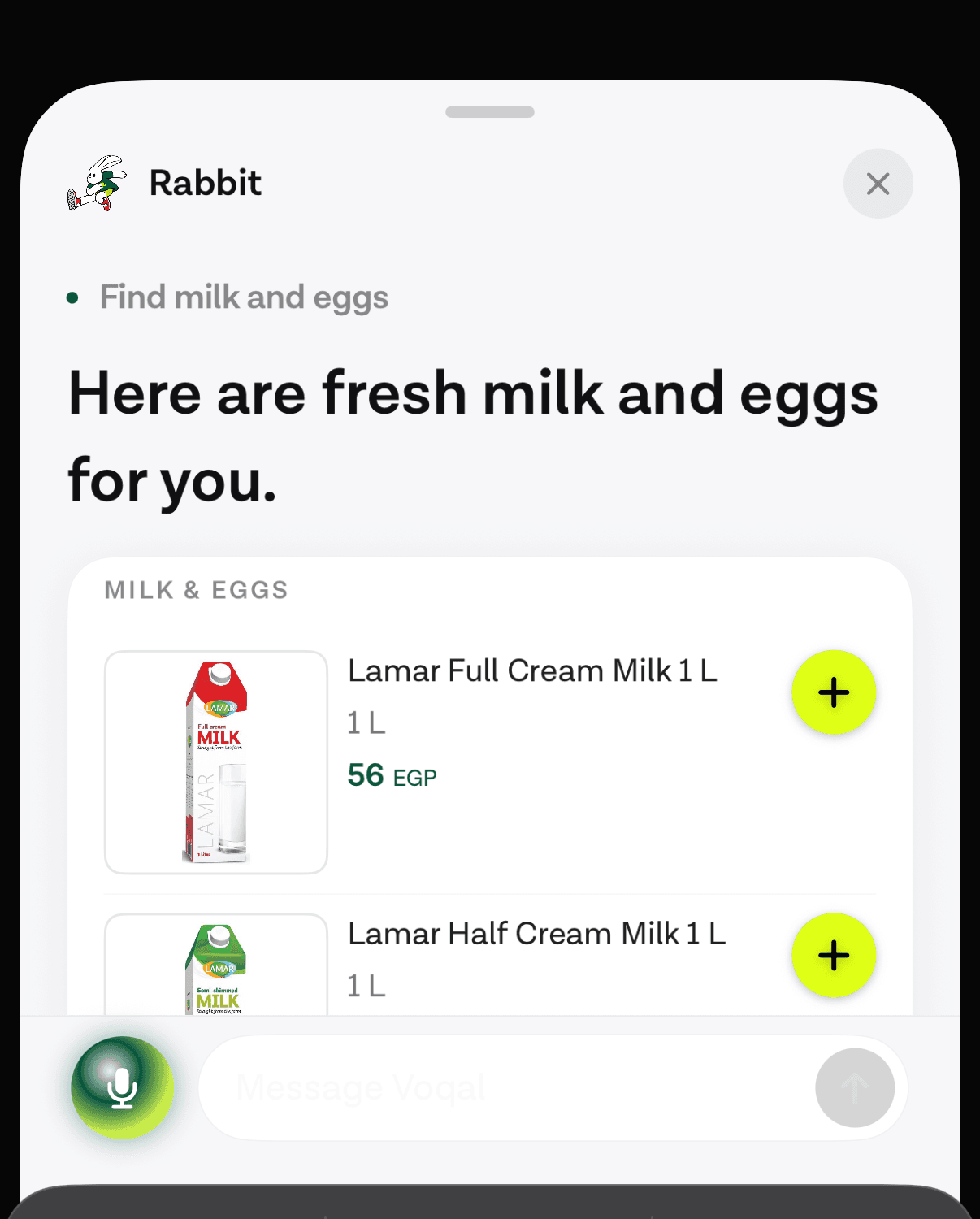
This is also where confirmation lives. An action that writes resolves to a confirm widget instead of running, and nothing happens until the user taps it.
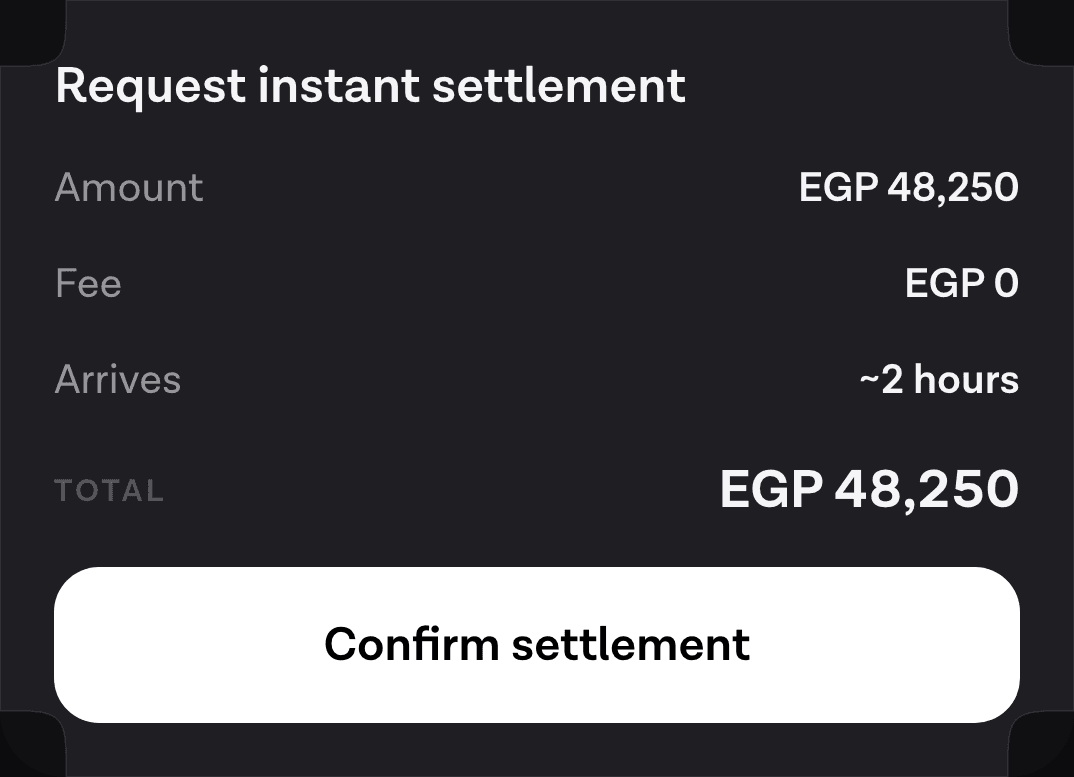
Designing for that gate is the difference between an agent you can ship and one legal will not let you ship. If the model guesses wrong about an amount, a date or a recipient, the user reads it on the card and dismisses it. Being wrong becomes boring, which is the only state in which it is safe to let a model act at all.
What you keep and what you hand over#
Speech in and speech out, turn taking, interruption, retries, the agent loop, the tool schemas, the streaming transport, the assistant UI on each platform: all of that is maintenance surface with nothing to do with what your product is for. It also changes underneath you, because the model providers keep changing it.
The bottom row is the part worth your team’s time. Which operations the agent may call, what each one is allowed to do, what the user sees before it runs, and what the result looks like. A runtime that takes the rows above it and leaves that one alone is doing the right trade. A runtime that also decides what a turn means, what a widget can be, or which model you use is one to check carefully before you commit.
Where to start#
Pick one task a user would recognise, phrased with a verb in it. Reorder my usual. Tell me why this charge appeared. Move my delivery to Thursday. One sentence, because the sentence determines the tool list and the tool list determines whether this is a week of work or a quarter.
Then expose the two or three operations that task needs, and only those. Everything else in your API stays invisible to the agent. The operations you do expose keep the auth, the validation and the limits they already have, so the blast radius of a bad model day is bounded by the permissions of the user who is signed in.
// Wire the SDK once, at launch, then open it from any screen.
VocalSDKManager.shared.setup(with: config)
VocalSDKManager.shared.prewarm(delegate: self)

// The delegate hands over the user's live token on every request,
// so the agent acts as the signed-in user and nothing more.
func getToken() -> String { AuthStore.current.accessToken }
The first turn that comes back with a real balance, a real order or a real confirm card in it is the point where the rest of the roadmap becomes an argument about scope rather than an argument about feasibility. That is worth reaching in the first week.
Sources
- cart abandonment at 70.22%baymard.com
Next
The quickstart wires the SDK into an iOS app and gets one turn running against your own backend.
Run one real turn in your appThe rest of Agent basics
Open the clusterThe structural difference between something that answers and something that finishes the task, and how to tell which one a vendor is selling you.
- What an in-app AI agent actually is, and what it can touchThree different things get called an AI agent in a mobile app. Here is the one that lives inside your product and acts through your own backend.11 min
- When voice actually works in an app, and when it doesn'tAn honest framework for deciding which tasks belong to a spoken path, which belong to text, and which should stay on the screen.8 min
- Voice or chat: picking the mode for the taskSpeaking and typing are two inputs to the same agent. The situation the user is in decides which one wins, and four of those situations are predictable.9 min
- Why pre-LLM assistants failed, and what changedAssistants before 2023 broke at the layer that turned words into actions. Three things replaced it: open intent, named tool calls, and a loop that checks first.10 min
- Agents in a shopping app: reorder, track, returnThe three retail tasks worth giving an agent, why reorder is first, and how to check whether your catalogue supports the case at all.7 min
- What an in-app agent SDK actually doesThe boundary between an agent SDK and your app, the five phases of a turn and what breaks in each, and why the write path is the part that decides the project.8 min
- Agent or chatbot: telling the two apart before you buyA support bot answers questions. An in-app agent finishes the task. Five questions that separate them in any vendor demo, and where a chatbot still wins.10 min
- Letting users reorder by voice in three tool callsRepeat purchase is the cheapest first agent feature to ship. Three tools carry it, only one of them writes, and a confirm card sits between the second and the third.6 min
- When not to put an AI agent in your appFour situations where an in-app agent loses to the interface you already have, and the test to run before you commit a quarter to building one.10 min
Elsewhere on the map
- Shipping UI without a release: the case for server-driven UIWhy mobile teams move layout decisions to the server, what it costs in versioning and coupling, and what changes when an agent is the thing choosing the shape.Render spec8 min
- Generative UI on native mobile: how an agent draws real product UIGenerative UI on the web streams React components. On iOS and Android it has to become a typed spec over a fixed native catalogue. Here is why, and how it works.Render spec15 min
- Which agent actions deserve Face ID, and which do notBiometric-gating everything trains users to approve without reading. Tier agent actions by what they can destroy, and let the platform decide how.Safety10 min