
Which agent actions deserve Face ID, and which do not
Biometric-gating everything trains users to approve without reading. Tier agent actions by what they can destroy, and let the platform decide how.
About this article
Tier agent actions by reversibility rather than by importance. Reads need no gate. Writes the user can undo inside your app need a confirm card they tap. Only actions that move money out, change where money goes, or expose data a stranger holding the unlocked phone should not see deserve a biometric prompt.
The instinct, when an agent can act, is to put Face ID in front of everything. It feels responsible. It is the single fastest way to make the biometric prompt meaningless, because a user who is asked eleven times a day stops reading what they are approving and starts approving to make the sheet go away.
The alternative is a tier list, sorted by what the user cannot take back.
The tiering rule, stated once#
Gate an action by what it destroys, not by what it sounds like. A read gets no gate, because the user could already see the data. A write the user can undo from inside your app gets a confirm card they tap. A biometric prompt is reserved for actions that move value out of reach, change where value goes in future, or expose something a stranger holding the unlocked phone should not see.
Three tiers, worked through#
Tier one: reads#
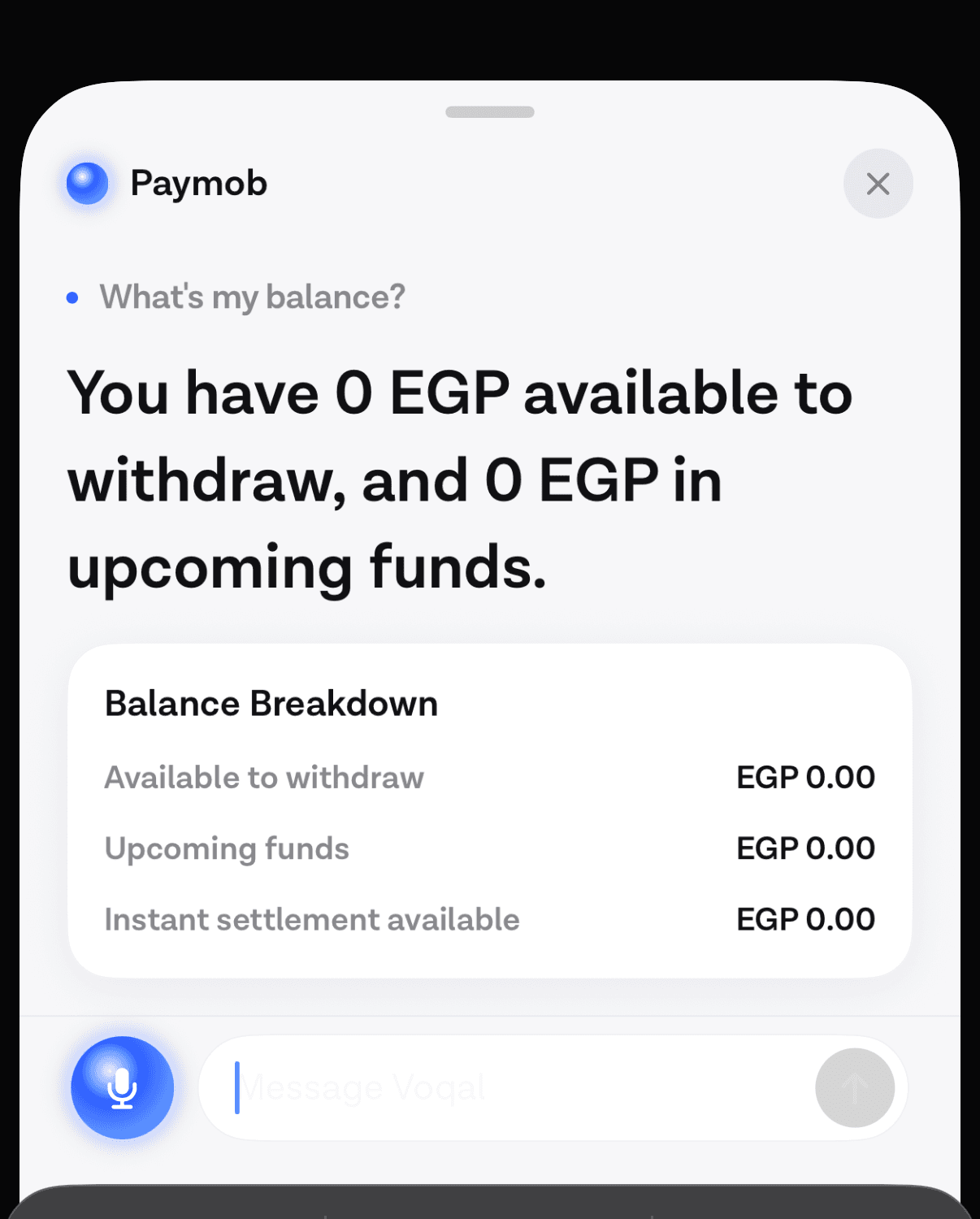
An agent answering “what’s my balance” is showing the user a number they could have found by tapping twice. There is no gate on the tap, so there is no reason for a gate on the question. Adding one teaches the user that the prompt is noise.
Tier two: writes the user can undo#
Creating a payment link, sending an invoice, adding items to a basket. Something now exists that should not, and the user can delete it from inside your app in two taps. The correct gate is a card that states the exact amount and recipient, which the user accepts with a tap.
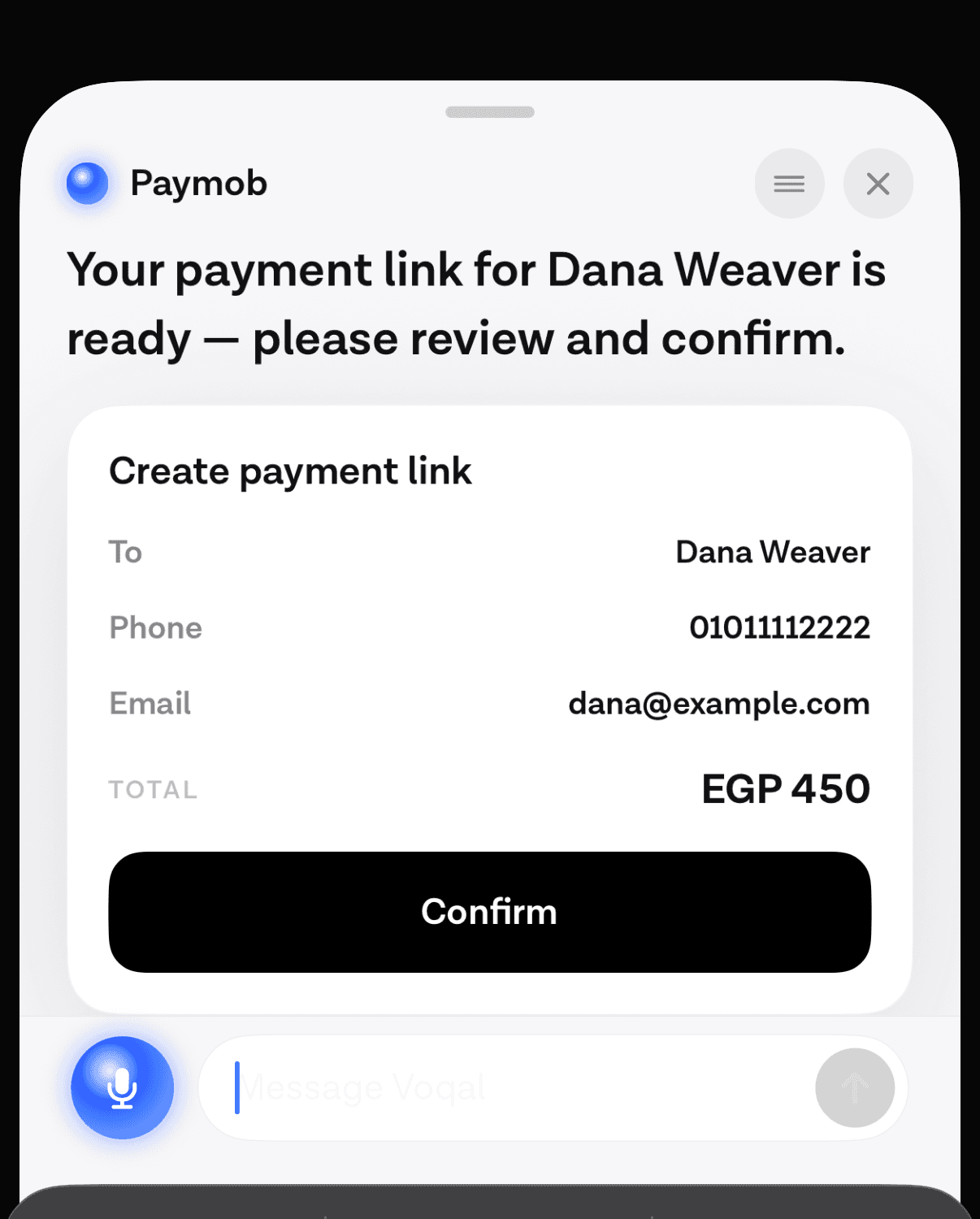
The card matters more than the biometric would. Reading an amount is the part that prevents the mistake; proving identity is not, because the person holding the phone already unlocked it.
Tier three: the ones you cannot take back#
Settling a balance to a bank account. Changing the account money will be paid into next time. These share a property: once done, the user cannot reverse them from inside your product, and in the second case the damage is in the future rather than the present.
What the platforms already give you#
Both mobile platforms document this tiering, which is a good sign that it is the right shape.
Android: classes, device credentials and auth-per-use keys#
Android’s
biometric authentication guide
defines BIOMETRIC_STRONG as “authentication using a Class 3 biometric”, BIOMETRIC_WEAK as Class 2,
and DEVICE_CREDENTIAL as “authentication using a screen lock credential, the user’s PIN, pattern, or
password”. You combine them explicitly: “to define the types of biometric authentication that your app
accepts, pass an authentication type or a bitwise combination of types into the
setAllowedAuthenticators() method.”
For the top tier the mechanism goes further than a yes or no answer. You can bind a key so that it requires authentication on every single use, and Google’s documentation names the case directly: “auth-per-use keys can be useful for high-value transactions, such as making a large payment or updating a person’s health records.” The result is cryptographic rather than procedural. The operation cannot proceed without the authentication, because the key is unusable without it.
iOS: the same idea through the Secure Enclave#
Apple’s platform security guide describes the equivalent path. Apps can “generate and use Elliptic Curve Cryptography (ECC) keys inside the Secure Enclave that can be protected by Optic ID, Face ID, or Touch ID”, and “operations with these keys are always performed inside the Secure Enclave after it authorizes their use.”
Apple is also explicit about what your app learns, which turns out to be the useful part: “apps are notified only as to whether the authentication is successful. Apps can’t access Face ID data associated with the enrolled face.”
Why the agent must not name the method in speech#
A small rule with a large effect: the agent’s spoken answer should never say “confirm with Face ID”. Two reasons.
The first is that it is often wrong. The user may have Face ID disabled, may be on a device without it, may be enrolled only for the device credential. The platform decides which method to present based on what is enrolled and what you allowed, and it decides that after the agent has finished speaking.
The second is a security habit worth building. An assistant that announces an authentication method is an assistant that has trained its users to expect prompts introduced by conversation, which is exactly the pattern an injected instruction would exploit. Let the sheet arrive unannounced, drawn by the platform, in the place users have seen it a thousand times before.
The accessibility argument nobody makes#
Biometric confirmation is usually argued as a security cost paid for safety. Under WCAG 2.2 it is also an accessibility improvement, and the criterion says so.
Success criterion 3.3.8, Accessible Authentication (Minimum), at Level AA, requires that “a cognitive function test (such as remembering a password or solving a puzzle) is not required for any step in an authentication process” unless one of four exceptions applies, and one of those exceptions is Object Recognition. The understanding document names biometrics directly, alongside “fingerprint scanning, facial recognition or keystroke dynamics”.
So the alternative to a biometric prompt is usually worse for accessibility, not better. Asking the user to re-enter a password, type a code from a message, or answer a security question is a cognitive function test. A glance is not. That is part of the accessibility case for a conversational path, and it is the argument least often made in this space.
What WebAuthn does and does not give you#
Worth stating plainly, because it is commonly assumed. WebAuthn Level 3, a W3C Recommendation since 25 August 2026, distinguishes user presence, “a simple form of authorization gesture” yielding a boolean, from user verification, “the technical process by which an authenticator locally authorizes the invocation” of its operations, with the stated intent “to distinguish individual users”. It also states that “authenticators are responsible for ensuring that no operation is performed without user consent”.
What it does not contain is a transaction confirmation mechanism. There is no way in that
specification to display “send 1,000 to this account” on the authenticator itself and have the
signature cover that text. The txAuthSimple extension from earlier drafts is not in Level 3. So the
amount the user reads is on a screen your app drew, and the integrity of that screen is your problem,
which is the entire argument for the confirm card being a server-built
artefact rather than something the model composes.
Where agentic commerce is going, and why in-app is different#
The card networks have arrived in this territory with a different problem. Visa’s Intelligent Commerce describes agentic commerce as “commerce experiences where AI agents help consumers or businesses discover products, make decisions and complete parts of the purchasing journey”, and frames it across a network of merchants: agents that “shop and buy” on a user’s behalf, across sites the user has no relationship with.
An agent inside your own app is a smaller and better-posed problem. The user is already signed in. The agent holds a token scoped to that one person. There is no question of which merchant is being trusted, because there is one, and it is you. Most of the machinery being built for cross-merchant agentic commerce is solving a trust problem you do not have, which is why the in-app tiering above can be this simple.
Getting the tier list right for your own app#
Write down every tool the agent can call. For each one, answer the four questions in the decision flow above and nothing else. Resist the meeting where someone argues a tool belongs in tier three because it is important, because importance is not the axis: reversibility is.
Then check the shape of the result. If more than a handful of tools land in tier three, the list is wrong, and the symptom will be users approving without reading within a fortnight. In our own production deployment exactly one action carries a biometric requirement, and that is a system running real money for real merchants.
The list also has to live somewhere the model cannot reach. A tier written into a prompt is a suggestion; a tier written into the server’s routing table is a rule, and the enforcement boundary is the only part of this that survives an adversarial input. The end-to-end payment flow, from question to receipt, shows where each tier sits in a real sequence.
One last practical note. Tiers change. An action that was reversible last quarter stops being reversible when someone ships instant settlement, and nothing in your code will tell you, because the tool signature did not change. Re-running the four questions when a backend behaviour changes is the maintenance cost of this approach, and it is cheaper than the alternative.
Common questions#
Which AI agent actions need biometric confirmation?#
Actions the user cannot reverse from inside your app: moving money out, changing a payout destination, or revealing data a stranger holding the unlocked phone should not see. Everything else is either a read with no gate or a write behind a confirm card.
Is Face ID enough to authorise a payment in an app?#
It proves the person present is the enrolled user, and on both platforms it can be bound to a key so the operation cannot run without it. It does not prove what the user was shown. WebAuthn Level 3 has no transaction confirmation mechanism, so the amount on screen is your app’s responsibility and the confirm card has to be built server-side.
What is the difference between user presence and user verification?#
WebAuthn defines user presence as a simple authorisation gesture producing a boolean, with no biometric recognition involved. User verification is the authenticator locally authorising the operation, with the intent of distinguishing individual users. A touch is presence; a face or a passcode is verification.
Does requiring Face ID hurt accessibility?#
It usually helps. WCAG 2.2 success criterion 3.3.8 forbids requiring a cognitive function test in authentication unless an exception applies, and object recognition, which covers biometrics, is one of the named exceptions. Asking for a remembered password or a code from a message is the option that fails the criterion.
Sources#
- Android Developers, Show a biometric authentication dialog. Page last updated 1 September 2026.
- Apple, Uses for Optic ID, Face ID, and Touch ID, Apple Platform Security guide, edition dated 19 December 2024.
- Apple, About Face ID advanced technology, last updated 9 December 2024.
- W3C, Understanding Success Criterion 3.3.8: Accessible Authentication (Minimum), WCAG 2.2.
- W3C, Web Authentication: An API for accessing Public Key Credentials, Level 3, W3C Recommendation, 25 August 2026.
- Visa, Visa Intelligent Commerce. Accessed 12 September 2026.
Next
How an action is gated, what the confirm step guarantees, and what leaves the device.
Read how the confirm gate is enforcedThe rest of Safety
Open the clusterConfirm-first actions, biometric tiering, scoped tokens and the audit trail you need before an agent touches money.
- Confirm cards: letting an agent act without losing controlIf the confirmation lives in the prompt it is a suggestion. Make it a branch in your server code, and decide the tier per tool rather than per sentence.12 min
- Designing a confirm-and-pay flow an agent can runThe payment path end to end: where the write is intercepted, what the card must show, when a biometric is worth asking for, and why speech is never the credential.10 min
- An agent in a banking app, and the gate before money movesHow to let an agent act inside a fintech app: which actions get a confirm card, which get a biometric, and why the gate lives in code.8 min
- Security and privacy for an agent that can act on your dataThe threat model for an in-app agent is its tool set, not its microphone. The OWASP entries that apply, the injection path, and the controls worth building first.9 min
- Does your agent work eight times out of eight?Average accuracy is the wrong number for a product. Run the same task eight times and count how often it worked every single time.11 min
- Prompt injection when the agent can spend moneyIn a consumer app the untrusted text is your own user's data and the tools move their money, which makes filtering useless and structure the only real defence.10 min
Elsewhere on the map
- An agent in a healthcare app: booking, refills, and the stop lineThe three patient-facing tasks an in-app agent does well, the escalation line that belongs in code, and the compliance question to settle before any of it.Business9 min
- Letting users reorder by voice in three tool callsRepeat purchase is the cheapest first agent feature to ship. Three tools carry it, only one of them writes, and a confirm card sits between the second and the third.Agent basics6 min
- In-app agents that finish the task instead of answeringAn assistant that describes where a setting lives competes with your own navigation. One that completes the request does not. What changed, and what to build.Agent basics8 min