
Letting users reorder by voice in three tool calls
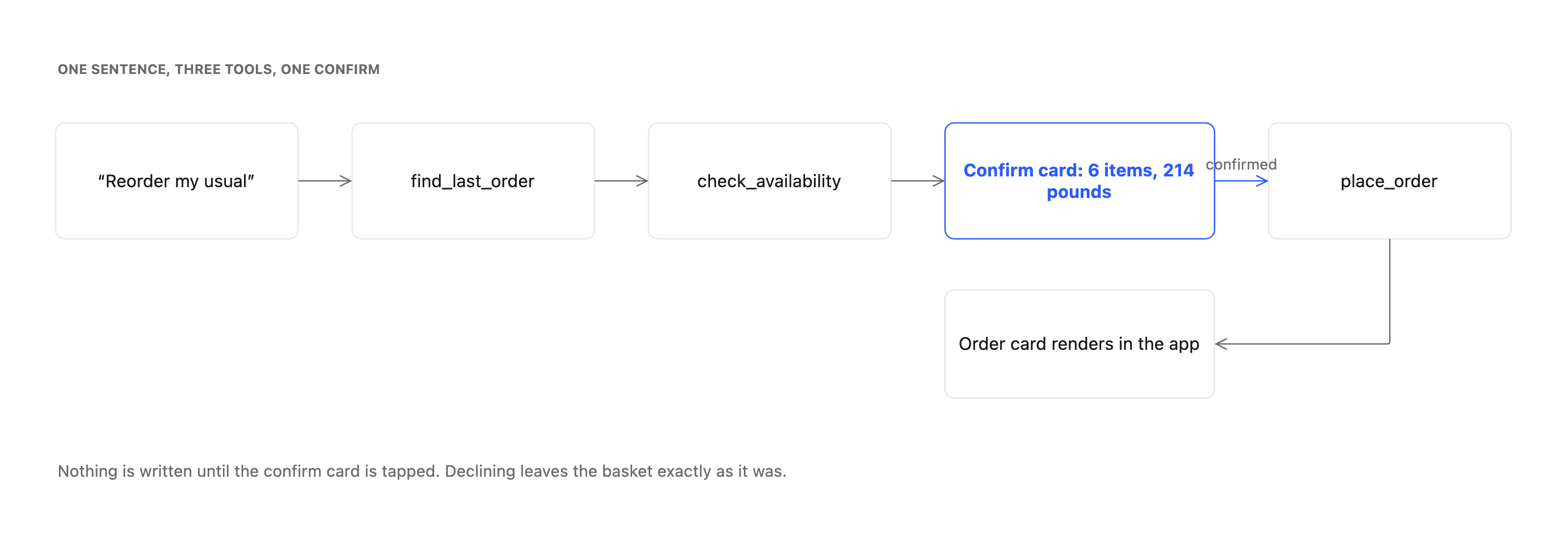
Repeat purchase is the cheapest first agent feature to ship. Three tools carry it, only one of them writes, and a confirm card sits between the second and the third.
About this article
Reorder by voice needs three tools: read the user's last order, check what is still in stock at today's prices, and place the new one. Only the third writes, and it runs after a confirm card the user approves. Substitutions go on the card as unchecked options rather than into the spoken sentence.
Why repeat purchase first#
A user who says “reorder my usual” has already made every decision the product normally asks them to make. They chose the items on a previous visit, they chose the quantities, and they are telling you the answer rather than asking a question. The agent’s job shrinks to fetching something that exists and asking one question before it writes.
That is what makes it a good first feature. The tool list is short enough to reason about, the failure modes are visible, and you find out within a week whether the plumbing in your app works, without betting a quarter on a feature where the model has to be creative. The general case, and why a finished task beats a good answer, is the argument this sits underneath.
The three tools#
find_last_order takes the signed-in user and returns their most recent completed order with its line items. It reads. If the user has never ordered, it returns an empty result, and the agent has to say so rather than invent a basket. Make that case explicit in the tool description, because a model given an empty list and no instruction will sometimes fill it.
check_availability takes those line items and returns, for each one, whether it is in stock and at what price today. Prices move and products get delisted, so the basket the user is about to approve is rarely the basket they bought last time. This is the call teams skip in the first version and add after the first support ticket.
place_order takes the approved line items and writes. It is the only call in the flow that changes anything, and it runs after the confirm, never before.
Three tools, and the middle one decides whether users trust the feature. This walkthrough assumes you have already decided what an in-app agent is and what you would let it touch. How those three reach your backend at all is the tool seam, which is a longer story than this one.
Where the confirm sits#
An action tool does not execute when the model selects it. It resolves to a confirm widget carrying what the model intends to do: the items, the count, the total, the address. The user reads it and taps, or dismisses it and nothing at all has happened.
This is worth being precise about, because it is the property that makes the whole pattern shippable. The model is not trusted with the write. It is trusted with a proposal, which a person then approves in an interface your team designed. If the model misreads “my usual” and proposes last month’s party order instead of last week’s groceries, the cost is that the user reads six items, says no, and rephrases. Nothing to reverse, nothing to refund, no support ticket.
The card itself should show the numbers a person would check before paying: item count, total, and anything that changed since last time. A confirm card that says “Place your usual order?” with a single button is a dialogue box wearing a nicer font.
Substitutions, which is the actual hard part#
Two of the six items are out of stock. Now what?
The tempting answer is to have the agent pick replacements and mention them in the spoken sentence. It reads well in a demo and it is the wrong call. Users do not audit a sentence the way they audit a list, and a substitution the user did not notice becomes a complaint about the wrong product arriving, which is more expensive than the abandoned basket you were trying to save.
Show it instead. The confirm card carries the four items that are available, the two that are not, and any suggested replacement as an unchecked option the user has to actively accept. The spoken answer says that two things are unavailable and stops there, because speech is a bad medium for a list the user has to inspect.
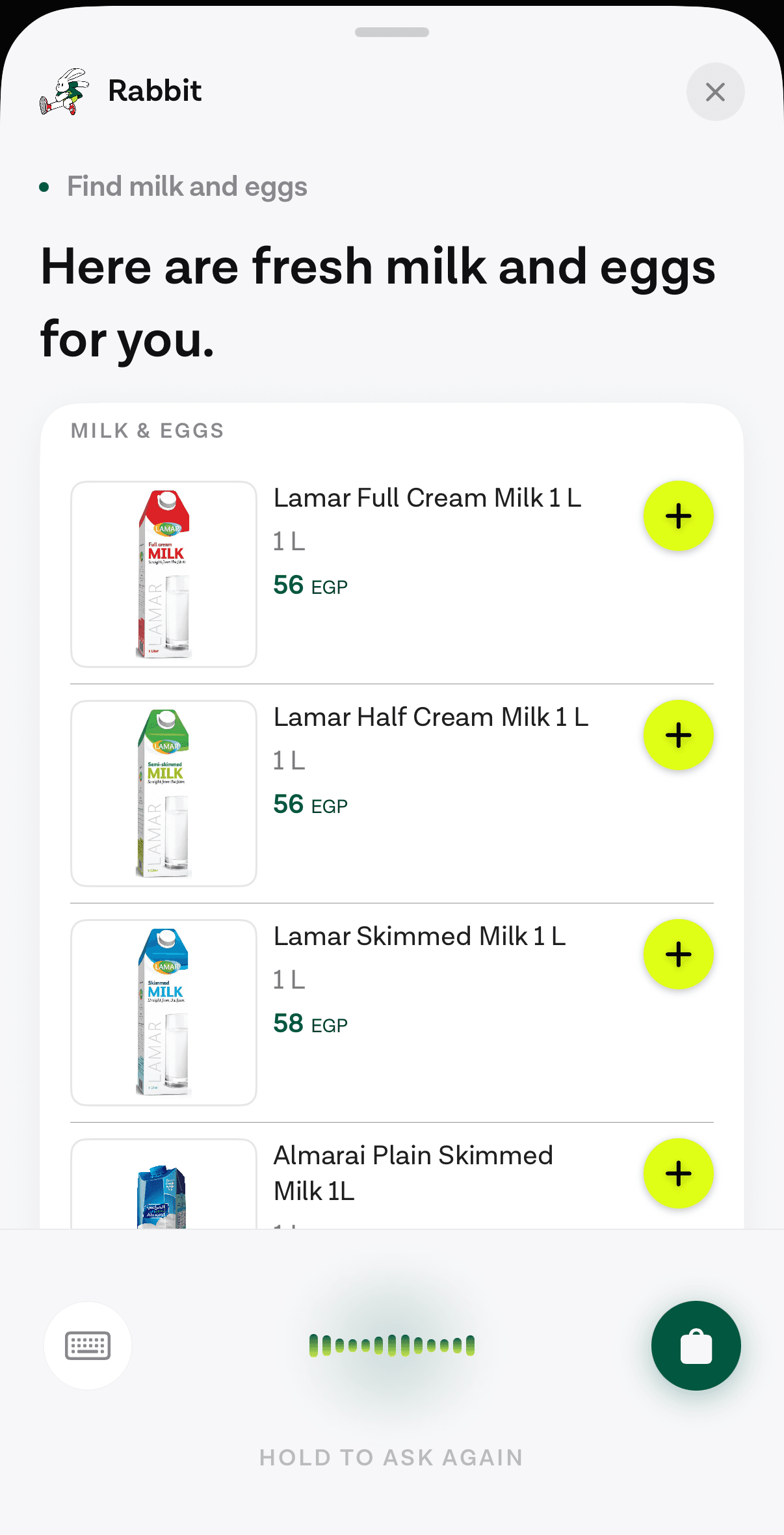
The same principle covers a price change. If the total moved more than a little since the last order, the card says so above the button rather than below it.
What the app has to provide#
Very little, which is the point. The app opens the assistant, hands over the user’s existing token on each request, and renders the widget types it has registered. The reorder flow needs three of them: a products list, a confirm card, and an order card for the result. Each one’s payload is in the widget catalogue.
None of those are chat components. They are your components, registered against a widget type, so the list of milk in the screenshot above uses the grocery app’s own card, type scale and add button. A user who taps “add” on a row in that list is in the same interaction they would be in anywhere else in the product.
What to measure#
Instrument three things before you ship it, because each one tells you about a different failure.
Confirm-card dismissal rate tells you whether the model is proposing the right basket. A high rate means “my usual” is resolving to the wrong order, and the fix is in the tool rather than the prompt. Time from first word to confirm card tells you whether the two reads are fast enough to keep in the same turn, or whether the availability check belongs behind a loading state. Completion rate after tap tells you whether the write path is solid under the conditions real phones are in.
None of those need a model to interpret. They are ordinary product metrics, which is a good sign that the feature has stopped being an experiment.
Next
The confirm, products and order widgets this flow returns, with the payload each one expects.
See the widget catalogueThe rest of Agent basics
Open the clusterThe structural difference between something that answers and something that finishes the task, and how to tell which one a vendor is selling you.
- What an in-app AI agent actually is, and what it can touchThree different things get called an AI agent in a mobile app. Here is the one that lives inside your product and acts through your own backend.11 min
- When voice actually works in an app, and when it doesn'tAn honest framework for deciding which tasks belong to a spoken path, which belong to text, and which should stay on the screen.8 min
- Voice or chat: picking the mode for the taskSpeaking and typing are two inputs to the same agent. The situation the user is in decides which one wins, and four of those situations are predictable.9 min
- Why pre-LLM assistants failed, and what changedAssistants before 2023 broke at the layer that turned words into actions. Three things replaced it: open intent, named tool calls, and a loop that checks first.10 min
- Agents in a shopping app: reorder, track, returnThe three retail tasks worth giving an agent, why reorder is first, and how to check whether your catalogue supports the case at all.7 min
- What an in-app agent SDK actually doesThe boundary between an agent SDK and your app, the five phases of a turn and what breaks in each, and why the write path is the part that decides the project.8 min
- In-app agents that finish the task instead of answeringAn assistant that describes where a setting lives competes with your own navigation. One that completes the request does not. What changed, and what to build.8 min
- Agent or chatbot: telling the two apart before you buyA support bot answers questions. An in-app agent finishes the task. Five questions that separate them in any vendor demo, and where a chatbot still wins.10 min
- When not to put an AI agent in your appFour situations where an in-app agent loses to the interface you already have, and the test to run before you commit a quarter to building one.10 min
Elsewhere on the map
- Agents in a travel app: rebooking is the feature worth buildingBooking is already a form. The task an agent is uniquely good at is rebooking under disruption, and it needs four read tools before it can answer anything.Business8 min
- What a checkout screen costs, and what the research measuresThe checkout abandonment numbers everyone quotes, what they were actually measured on, and which reasons a redesign can move.Business8 min
- Does your agent work eight times out of eight?Average accuracy is the wrong number for a product. Run the same task eight times and count how often it worked every single time.Safety11 min