
MCP for in-app agents: connecting your tools to a model
The Model Context Protocol replaces one connector per backend with one protocol. What it is, how a tool call actually happens, and what it costs on the first turn.
About this article
The Model Context Protocol is an open standard that lets a model discover and call your application's tools through one uniform interface, instead of a hand-written connector per backend. The model never executes anything itself: it names a tool, and your runtime decides whether to run it. That gap is what makes authorisation and confirmation possible at all.
Tools are the hard part, not the model#
An agent that can only describe what it would do is a demo. The moment it has to move something real, reschedule the delivery, issue the refund, file the ticket, you stop working on prompts and start working on integration.
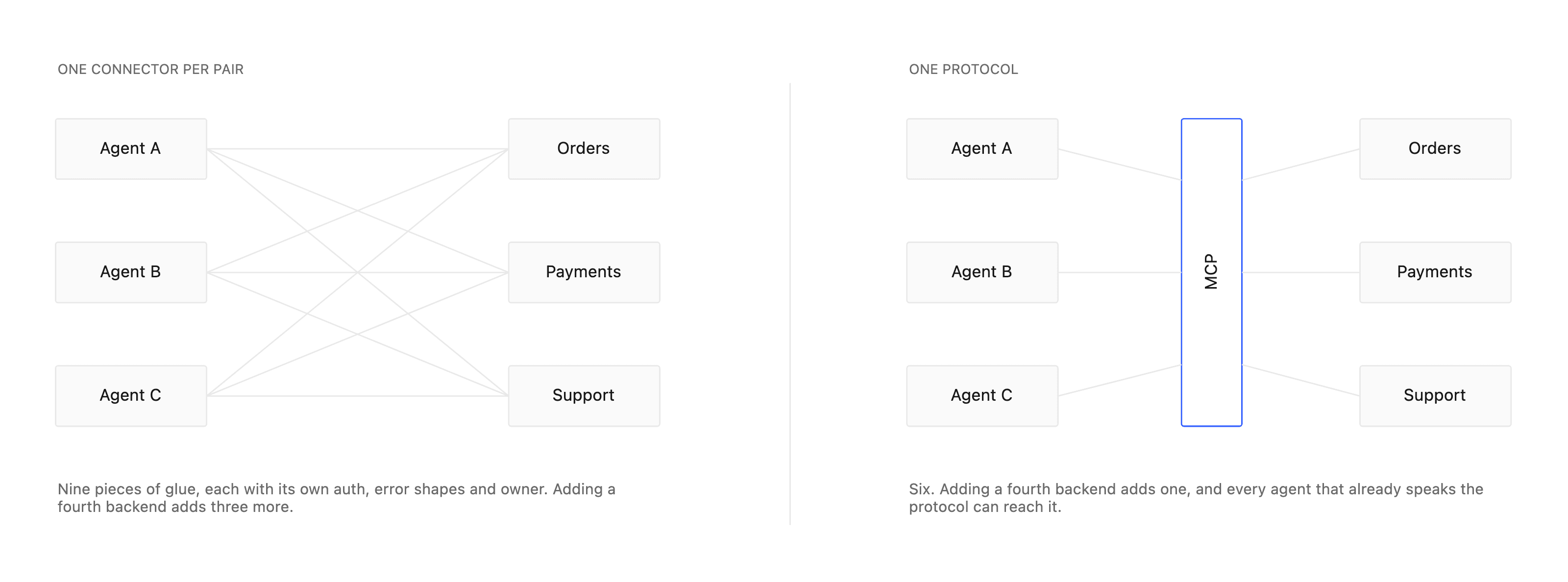
That integration used to be the bulk of the project. Every model needed a bespoke connector for every data source, and the connectors did not compose: five models against six backends is thirty pieces of glue, each with its own auth, its own error shapes and its own owner. Anthropic published MCP in November 2024 to collapse that into one protocol, and the ecosystem picked it up quickly enough that most backends you would want to reach now either speak it or have a wrapper that does. Anthropic’s announcement is the short version of why.
If you have not decided whether an agent belongs in your app at all, start with the case for an agent that finishes the task rather than describing it. This post assumes that decision is made, and the question is how the thing reaches your backend.
What MCP actually is#
MCP is a client-server protocol. An MCP host, your agent runtime, contains an MCP client, which opens a connection to one or more MCP servers. Each server advertises capabilities: tools it can run, resources it can read, prompts it can supply. Messages are JSON-RPC, over one of two transports.
- stdio. The server runs as a local subprocess and the client pipes JSON-RPC over stdin and stdout. No ports, no TLS, no CORS. This is the right transport for a developer tool on the same machine.
- Streamable HTTP. The server is an independent process at a single HTTPS endpoint that can stream responses. This is what a hosted runtime uses to reach a tenant’s API, and it is the one you will use.
Two operations carry almost all the traffic, and they are described in the tools section of the specification. On connect, the client calls tools/list to discover what exists, with a JSON schema for each tool’s inputs. When the model decides to act, the client sends tools/call with a tool name and validated arguments. The transports section covers how those messages get there.
How a tool call actually happens#
This is the part architects most often get backwards, so it is worth stating plainly: the model never executes anything. As Anthropic’s tool-use documentation puts it, the model signals intent. You hand it a list of tools with input schemas; when it wants to act it emits a structured tool-use block; your runtime executes that call and feeds the result back for the model to describe.
The tool the model reasons over is nothing more than a name, a sentence and a schema. If the sentence is vague, the model picks the wrong tool. If the schema is loose, it passes the wrong arguments. This deserves more of your attention than the prompt does.
{
  "name": "create_payment_link",
  "description": "Create a shareable payment link for a given amount.",
  "input_schema": {
    "type": "object",
    "properties": {
      "amount":    { "type": "number", "description": "Amount in major units" },
      "currency":  { "type": "string", "enum": ["USD", "EUR", "EGP"] },
      "recipient": { "type": "string" }
    },
    "required": ["amount", "currency"]
  }
}
Walk one turn through, stage by stage:
- The user says something. The runtime sends the transcript, the conversation so far, and the tool list it got from
tools/list. - The model emits a tool-use block naming
create_payment_linkwith arguments it filled in from the sentence. - The runtime validates those arguments against the schema, checks whether this tool is allowed to run unattended, and either calls
tools/callor holds it. - Your server executes it, with the same auth, validation and rate limits your own API already enforces.
- The result goes back to the model, which turns it into an answer and names the widgets the app should draw.
MCP and model tool-calling compose cleanly because they describe the same thing in the same shape. The langchain-mcp-adapters library converts MCP tools into the tool objects a framework agent already binds, which is the pattern our own engine uses: one agent, tools loaded from whichever MCP connection belongs to the tenant making the request.
One runtime, many backends#
A hosted agent runtime serves many apps, each pointing at its own MCP server. Connecting on demand is the obvious implementation and the wrong one, for two reasons that pull in different directions.
Isolation#
One tenant’s tools, tokens and results must never reach another’s session. The way to guarantee that is to make the connection identity explicit rather than ambient: key each pooled connection on the environment, the region and a hash of the end user’s token, so a request cannot be served by a connection that was opened for somebody else.
Latency#
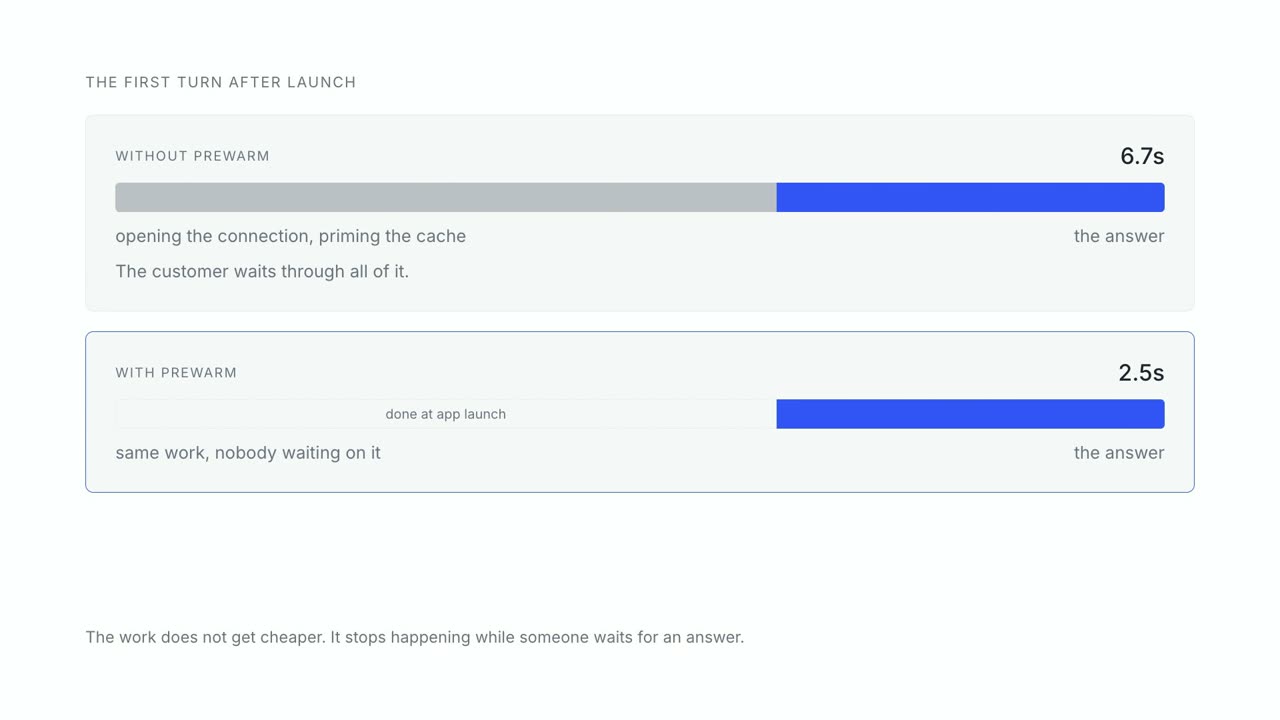
Spoken turns are unforgiving in a way that typed ones are not. Daily’s benchmarking work on voice agents puts the comfortable ceiling around 800ms and describes a stitched pipeline already spending most of that across speech, model and network before any tool runs. A cold initialize plus tools/list lands on top of that budget, and it lands on the first turn, the one where the user is deciding whether this feature is any good.
The fix is to stop paying it during the conversation. Keep idle connections open behind a generous idle window, and expose a prewarm call the SDK fires at app launch: it opens the connection, lists the tools and primes the model’s prompt cache while the user is still looking at your home screen.
| Concern | The obvious version | The one that survives production |
|---|---|---|
| Connection | Opened per request | Pooled, keyed per tenant, evicted when idle |
| First turn | Cold connect mid-conversation | Prewarmed at app launch |
| Tool discovery | tools/list on every turn | Listed once per connection, refreshed on change |
| Read-heavy tools | Re-fetched every time | Cached with a short time to live |
Connection lifecycle is the part teams leave out of a build-versus-buy estimate, because it does not appear in any tutorial. It is also the part that decides whether the first turn of the day feels instant or broken.
Securing the execution path#
Giving a model a button that moves money is exactly as dangerous as it sounds, and the 2025 incident record is specific about how it goes wrong. A crafted OAuth endpoint passed to a shell through a widely used proxy exposed a very large number of developer environments. Prompt injection has been used to talk a privileged agent into leaking integration tokens. Tool poisoning, writing a tool description that lures the agent into an unsafe call, is a studied attack class rather than a hypothetical.
The controls that matter, in the order they matter:
- Scope the token to the user, and read it live. The end user’s own credential rides every request and authorises the MCP server directly. The agent holds nothing broader, so the blast radius of a compromised runtime is one session’s worth of permissions.
- Hold every state-changing call behind a human. The guidance to bound permissions and require approval for risky operations is now the baseline. The agent proposes; the person approves the actual arguments before
tools/callruns. - Keep the approval out of the spoken answer. An agent that says “confirm with Face ID” has told an attacker what to imitate. Confirmation belongs in the interface.
- Log every call with a correlation id. You want to be able to answer what the agent did, on whose behalf, in which session.
- Bind the session to the device. A key in the device’s secure element signing each request means a stolen token on its own cannot replay an action.
Where the interface comes from#
MCP gets data and actions in. It says nothing about what the user sees. If you stop there, every structured answer, a balance, a list of three options, a receipt, arrives as a paragraph the user has to parse.
The other half of the contract is the render spec: after the call returns, the agent produces a spoken answer plus a small JSON array naming the widgets your app should draw, and the app draws them natively. Tools go in through MCP, interface comes out through the spec, and the client stays a shell that needs no new code per feature. The API reference documents both halves of one turn.
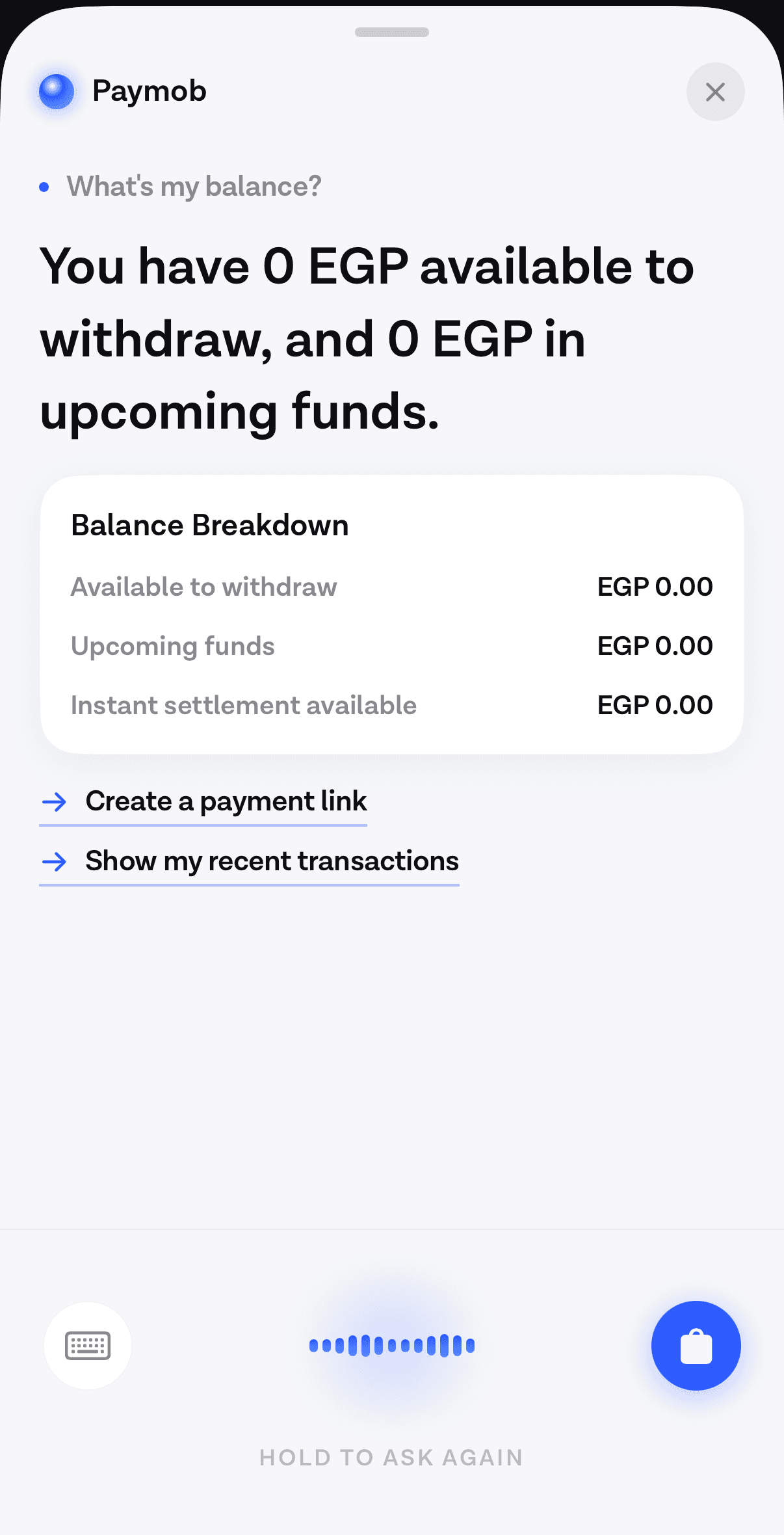
A small worked example of the whole path, from one sentence to three tool calls and a confirm card, is in the reorder walkthrough. The protocol is one way to reach your tools; the endpoints you already run behind it are the part that decides what the agent can actually do, with or without MCP.
Questions people ask#
Do I need MCP to build an agent?#
No. You can hand-wire tool calling against a single backend and it will work. The argument for MCP starts at the second data source, and gets decisive at the second tenant, because a uniform tools/list and tools/call is what keeps integration cost linear instead of multiplicative.
Does MCP make a turn slower?#
The first turn after a cold start, yes. initialize and tools/list are real network round trips on top of a budget that is already tight. Steady-state turns pay none of it, provided the connection is pooled and something warmed it.
Who executes the tool, the model?#
No. The model emits a structured tool-use block and stops. Your runtime executes the call and returns the result. Every authorisation and confirmation control you have depends on that gap existing.
Which transport should a hosted server use?#
Streamable HTTP: one HTTPS endpoint that can stream responses. stdio is for a subprocess on the same machine, which a hosted runtime reaching your API over the network is not.
Sources
- Anthropic's announcementanthropic.com
- tools section of the specificationmodelcontextprotocol.io
- transports sectionmodelcontextprotocol.io
- Anthropic's tool-use documentationanthropic.com
- langchain-mcp-adaptersgithub.com
- benchmarking work on voice agentsdaily.co
- exposed a very large number of developer environmentsdatasciencedojo.com
- bound permissions and require approval for risky operationstruefoundry.com
Next
The quickstart points an assistant at an MCP endpoint and runs a turn against your own data.
Connect your first toolThe rest of Tools and MCP
Open the clusterTool calling, the Model Context Protocol, per-tenant connections, and how to expose an API you did not design for a model.
- Connect an AI agent to the backend you already runYou do not need a new API surface for an agent. You need to describe the one you have, and decide what it is never allowed to touch.11 min
- The architecture of an in-app agent, for people who approve itEvery box in the system, who owns it, where the trust boundaries sit, and what changed between the intent-classification era and the one where a model chooses.9 min
- Designing a tool surface an agent can actually useTwo independent vendors put the practical ceiling near twenty tools. Everything else about tool design follows from the model reading your schema and nothing else.9 min
- Where the seconds go in an in-app agent turnWe measured a slow turn end to end. Most of the time was not in our code and not in the model, which changes what is worth optimising.10 min
Elsewhere on the map
- Prompt injection when the agent can spend moneyIn a consumer app the untrusted text is your own user's data and the tools move their money, which makes filtering useless and structure the only real defence.Safety10 min
- How fast does a voice agent have to be? A latency playbookWhere a spoken turn's milliseconds go, what the turn-taking research actually measured, and which tactics shorten which segment of the budget.Voice9 min
- What an in-app agent SDK actually doesThe boundary between an agent SDK and your app, the five phases of a turn and what breaks in each, and why the write path is the part that decides the project.Agent basics8 min