
Designing a tool surface an agent can actually use
Two independent vendors put the practical ceiling near twenty tools. Everything else about tool design follows from the model reading your schema and nothing else.
About this article
A tool surface is the set of functions an agent can call and the schemas that describe them. OpenAI advises fewer than 20 available at the start of a turn; Google advises 10 to 20 maximum. Keep names unambiguous, narrow enumerations so wrong calls are inexpressible, return identifiers rather than prose, and separate read tools from write tools in configuration rather than in the prompt.
Most agent failures that look like model failures are schema failures. The model called the wrong thing, or called the right thing with a plausible wrong argument, and the post-mortem blames the model. Anthropic’s own engineering team reached the same conclusion building an agent for SWE-bench and put it plainly: “we actually spent more time optimizing our tools than the overall prompt” (Building effective agents, 19 December 2024).
This is the practitioner’s version of that, for agents that run inside a consumer app rather than a backend job. It assumes you have already pointed the agent at your existing backend.
How many tools is too many#
Two vendors publish a number, they arrived at it independently, and they agree. OpenAI’s function calling guide advises: “Aim for fewer than 20 functions available at the start of a turn”, noting that this is a soft suggestion (OpenAI). Google’s Gemini guidance is blunter: “Keep active set to 10-20 tools maximum” (Gemini).
Ten to twenty, then, with the understanding that it is a band and not a law. In a field where most advice about tool counts is unsourced, two vendors converging is worth more than anyone’s opinion.
The band exists because every tool is prose in the context window on every turn. Its name, its
description and its full argument schema are re-sent each time, and they compete with the
conversation for the model’s attention. There is a fixed cost before you add a single tool of your
own: Claude Opus 5’s tool-use system prompt costs 286 tokens when tool_choice is auto and 406
when a tool is forced, and older models cost considerably more, up to 804 tokens
(Anthropic tool use overview).
The model only sees the schema#
This is the sentence to keep on a sticky note. Not your handler, not your database, not the internal
wiki page explaining that status has seven values but three of them are legacy.
A tool description is a name, a sentence about when to use it, and a JSON schema. If the correct choice between two tools depends on knowledge that lives anywhere else, the model will guess, and it will guess consistently wrong in ways that look random in your logs.
The practical test: hand a colleague only the tool list, with no access to your codebase, and give them three user requests. If they cannot pick the right tool and fill its arguments, neither can the model.
Naming, and namespacing when the list grows#
Anthropic’s guidance on writing tools recommends grouping related tools under common prefixes:
namespacing “by service (e.g., asana_search, jira_search) and by resource (e.g.,
asana_projects_search, asana_users_search) can help agents select the right tools at the right
time” (11 September 2025).
For an in-app agent the prefix is usually the domain rather than the vendor. orders_search,
orders_reorder, payments_list, payments_create_link. The prefix does real work once you pass
about a dozen tools, because it turns the model’s decision from a flat twenty-way choice into two
smaller ones.
Two naming rules that cost nothing. Name the operation, not the endpoint, so list_settlements
rather than get_v2_settlements. And never let two tools share a plausible reading: if you have
search_orders and find_orders, you have a bug waiting for a busy Tuesday.
Make the wrong call impossible rather than unlikely#
The strongest single idea in tool design is Anthropic’s poka-yoke framing: “Change the arguments so that it is harder to make mistakes.”
In practice this is three moves.
Narrow enumerations. A status parameter typed as a free string invites "complete", "COMPLETED"
and "done" for the same state. An enum of two or three values does not.
Remove scope parameters. If a tool takes an account identifier, then every answer’s correctness depends on the model passing the right one. Take it from the credential and the class of bug disappears.
Use strict schemas where the platform offers them. OpenAI’s strict mode requires that
“additionalProperties must be set to false for each object in the parameters” and that “all fields
in properties must be marked as required”, with optional fields expressed by adding null to the
type. That converts a category of silent malformed calls into an outright rejection.
Returning results an agent can use#
The return value is half the schema and gets a tenth of the attention.
Keep it small. Anthropic’s guidance is to implement “some combination of pagination, range selection, filtering, and/or truncation with sensible default parameter values for any tool responses that could use up lots of context”, and notes that Claude Code restricts tool responses to 25,000 tokens by default. A tool that returns every row it can find will eventually return a turn’s entire budget.
Offer a verbosity control rather than picking one. The same guidance suggests “exposing a simple
response_format enum parameter in your tool, allowing your agent to control whether tools return
"concise" or "detailed" responses”. A list view needs four fields per row; a detail answer needs
twenty.
Return identifiers, not just display strings. The agent will need the order id to call the next tool, and reconstructing it from a formatted title is exactly the kind of quiet error that surfaces three weeks later.
And make errors instructive. “Invalid request” teaches the model nothing. “from must be an ISO
date and must precede to; received from=last week” teaches it enough to retry correctly on the
next turn.
Read tools, write tools, and the line between them#
Split the surface in two, in configuration, once. Read tools execute immediately. Write tools never execute on the model’s say-so.
The runtime consults that list before dispatch. When the model names a write tool, the call is held, the arguments are kept exactly as the model produced them, and a confirm card goes back to the user instead. The model is not consulted about which side a tool is on, and it cannot be argued into a different answer, which is the entire point.
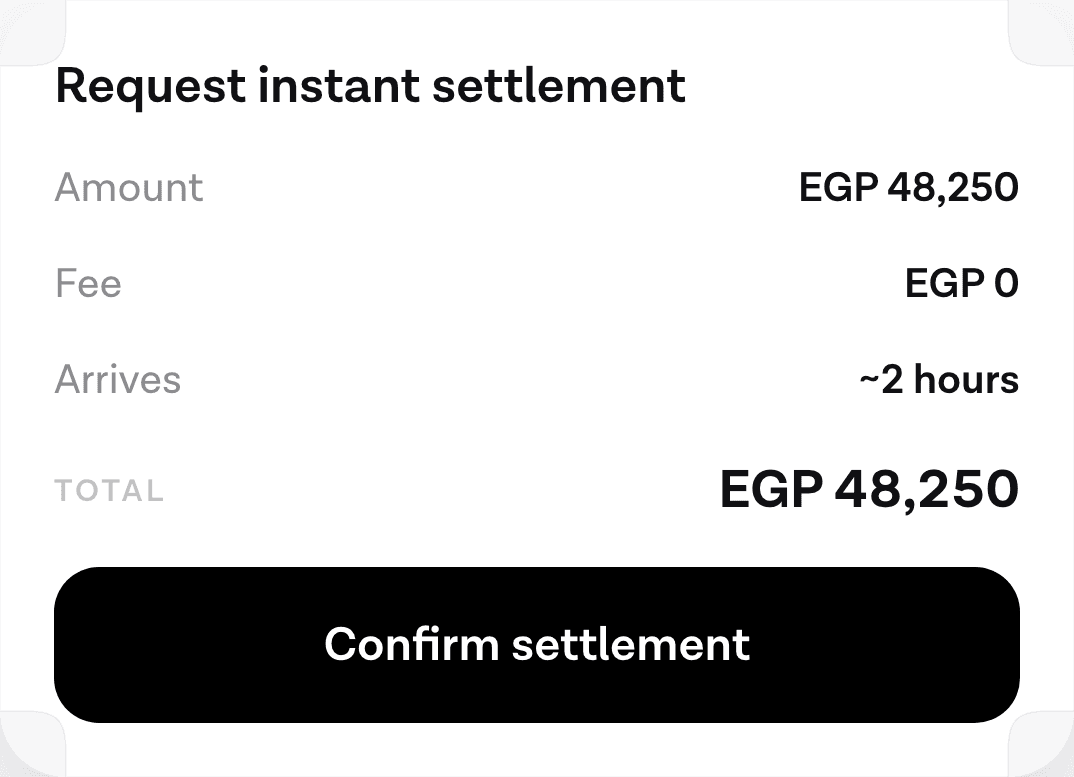
This is not a stylistic preference. The Berkeley Function Calling Leaderboard’s multi-turn analysis found that even the best models “sometimes fail to explore the current state before performing actions, which can be dangerous if the actions are non-reversible” (BFCL V3). A model that has not re-read the price will happily place the order at the old one. The gate that stops it belongs in code.
The mobile constraint nobody else writes about#
Everything published on tool design assumes a backend agent with a generous turn budget and nobody waiting. An in-app agent has a person holding a phone, watching an animation.
That changes three decisions.
Prefer one tool that answers the whole question over three that compose into it. A backend agent can afford four sequential calls; each one on a phone is a visible pause. If users routinely ask “what did I spend this week”, a tool that answers that beats a generic query tool the model has to call three times.
Design for the cold case. The first turn after a process restart pays a connection cost and a prompt-cache miss together, and a large tool surface makes the cache miss more expensive because there is more to re-read. Where the seconds actually go has the measured breakdown; the relevant part here is that tool schemas are part of the prompt.
And write failure text a user could almost read. On a backend the error goes to a log. Here the
model turns it into a sentence the user hears, so an error that says which field was wrong produces
a useful sentence and an error that says 500 produces an apology.
How to tell a tool is badly designed#
Four signals, all of them visible in a week of real traffic.
The model calls it and then immediately calls it again with different arguments. The description is ambiguous about what the first call returns.
The model never calls it. Either the description does not match the words users actually use, or a neighbouring tool looks like a better match for everything.
The model calls it with arguments it invented. A required field is not derivable from anything the user said, and the schema does not say what to do about that.
Answers are right but slow. The model is composing three calls where one tool should exist.
Instrument for this from the start. Anthropic’s recommendation is to collect, alongside accuracy, “the total runtime of individual tool calls and tasks, the total number of tool calls, the total token consumption, and tool errors.” Those four numbers tell you which tool to rewrite. The three failure scenarios the Berkeley leaderboard walks through, “failure to perform implicit actions”, “failure to understand the current state before performing action” and “unnecessary planning and thinking”, give you a ready-made way to sort the failures you find, and running that as a repeatable eval is how you find out whether the rewrite helped.
Common questions#
How many tools can an LLM handle? OpenAI advises fewer than 20 available at the start of a turn and calls it a soft suggestion. Google advises keeping the active set to 10 to 20 maximum. Treat that band as the working answer, and remember that every tool costs context on every turn.
Why does my agent call the wrong tool? Almost always because two descriptions are plausible readings of the same request, or because choosing correctly requires knowledge that is not in the schema. The model sees names, descriptions and argument schemas and nothing else.
Should tools be small and composable, or large and specific? On a backend, composable. Inside an app, lean specific, because each extra call is a pause the user watches. If a question is asked routinely, give it one tool.
Does the model execute my function? No. Google’s documentation states it directly: “The model doesn’t execute the function itself. Extract the name and args and execute in your application.” That execution point is where your read and write split is enforced.
Sources#
- Anthropic, Building effective agents, 19 December 2024. Accessed 12 September 2026.
- Anthropic, Writing tools for agents, 11 September 2025. Accessed 12 September 2026.
- Anthropic, Tool use with Claude. Accessed 12 September 2026.
- OpenAI, Function calling guide. Accessed 12 September 2026.
- Google, Gemini API function calling. Accessed 12 September 2026.
- Berkeley Function Calling Leaderboard, BFCL V3: Multi-Turn and Multi-Step Function Calling, 19 September 2024, updated 10 December 2024. Accessed 12 September 2026.
Next
The request and response shape of one turn, field by field.
Read the tool schema referenceThe rest of Tools and MCP
Open the clusterTool calling, the Model Context Protocol, per-tenant connections, and how to expose an API you did not design for a model.
- Connect an AI agent to the backend you already runYou do not need a new API surface for an agent. You need to describe the one you have, and decide what it is never allowed to touch.11 min
- The architecture of an in-app agent, for people who approve itEvery box in the system, who owns it, where the trust boundaries sit, and what changed between the intent-classification era and the one where a model chooses.9 min
- MCP for in-app agents: connecting your tools to a modelThe Model Context Protocol replaces one connector per backend with one protocol. What it is, how a tool call actually happens, and what it costs on the first turn.10 min
- Where the seconds go in an in-app agent turnWe measured a slow turn end to end. Most of the time was not in our code and not in the model, which changes what is worth optimising.10 min
Elsewhere on the map
- Does your agent work eight times out of eight?Average accuracy is the wrong number for a product. Run the same task eight times and count how often it worked every single time.Safety11 min
- Prompt injection when the agent can spend moneyIn a consumer app the untrusted text is your own user's data and the tools move their money, which makes filtering useless and structure the only real defence.Safety10 min
- What an in-app AI agent actually is, and what it can touchThree different things get called an AI agent in a mobile app. Here is the one that lives inside your product and acts through your own backend.Agent basics11 min