
How a render spec turns one JSON payload into native UI
The whole contract is a spoken answer, a separator, and an array of widget objects. The interesting parts are the constraints, not the format.
About this article
A render spec is the JSON an agent returns alongside its spoken answer, naming widgets from a fixed catalogue that the client already knows how to draw. The model never ships markup or code. It names a kind and supplies data, the client maps each object onto a native view, and anything outside the catalogue is rejected by the server before it reaches a screen.
Everything interesting about a render spec is a restriction. The format takes ten minutes to understand and about six months to get the constraints right, and the constraints are the reason the thing is safe to point at a payments backend.
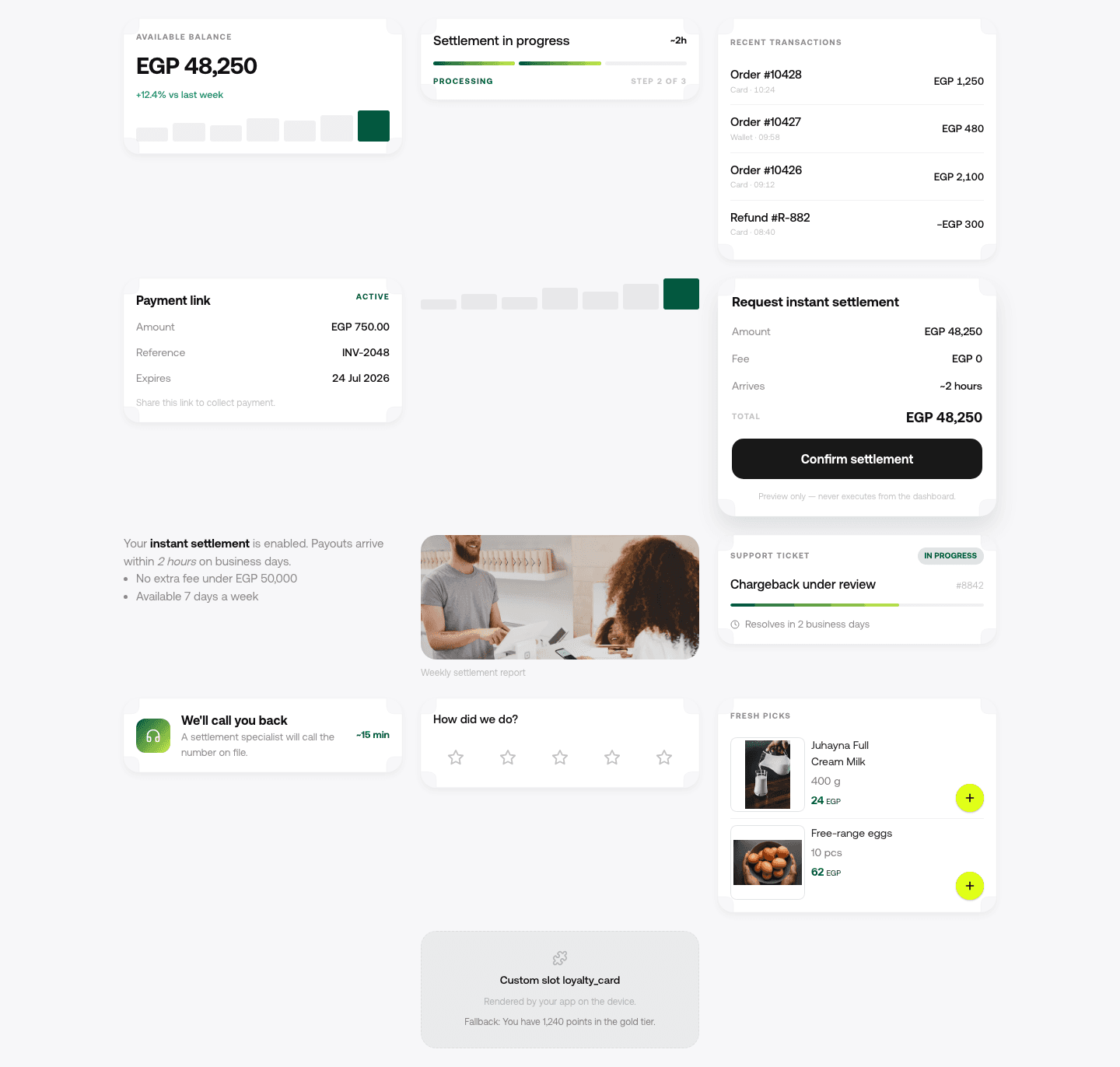
This post is the contract itself. The argument for why an agent should draw product UI at all is a separate one, and it comes first if you are not yet sold. The contact sheet at the top is the React harness we pixel-diff the SwiftUI renderer against, drawn on invented sample values, so it shows every shape at once in a way no single phone capture can.
The contract, in full#
One model call produces two things: a spoken answer, and a JSON array describing what to draw. They are separated by a sentinel, so the client can start speaking the first part while the second is still arriving.
Your available balance is 48,250 Egyptian pounds, with about 12,400 still settling.

===render===
[
  {
    "kind": "stat",
    "title": "Available balance",
    "value": "EGP 48,250.00",
    "delta": { "label": "settling", "value": "EGP 12,400.00" }
  },
  {
    "kind": "list",
    "title": "Last 3 settlements",
    "rows": [
      { "leading": "12 Sep", "title": "Card settlement", "trailing": "EGP 9,120.00" },
      { "leading": "11 Sep", "title": "Wallet settlement", "trailing": "EGP 3,040.00" },
      { "leading": "09 Sep", "title": "Card settlement", "trailing": "EGP 7,880.00" }
    ]
  }
]
That is the whole thing. No component code, no HTML, no styling, no layout instructions. The model
names a kind from a catalogue the client already ships and supplies the data for it. Everything
about how a stat looks, what typeface it uses, how it behaves under a screen reader and what
happens when the number is negative is decided in your app, once, by your designers.
Why the answer and the widgets come out of one call#
The obvious design is two calls: answer the user, then ask a second time what to draw. It is worse in three ways that matter more than the elegance.
A second call costs a second round trip against a budget that is already tight. A warm turn in our own runtime settles around 2.5 to 3 seconds end to end, and a second model call would put a visible dent in that. It also splits the reasoning: the model that chose the answer is the one that knows which numbers deserve a card, and asking a fresh call to infer that from the finished prose throws that context away. And it opens a window where the speech and the widgets can disagree, which users notice immediately because they hear one number and see another.
The cost of the single-call design is that the model is producing a structured tail after free prose, and models are imperfect at that. Which leads directly to the parsing section below.
Anatomy of a widget object#
Every object carries a kind and then whatever that kind needs. The catalogue in our own SDK runs
to roughly a dozen entries, visible in the capture at the top of this post: stat, progress, list,
record, chart, confirm, products, ticket, callback, rating, text and media, plus a slot for a
component the integrating team supplies themselves.
Three properties are worth designing for from the start.
Widget payloads are small on purpose. Anthropic’s guidance on writing tools for agents applies directly here: implement “some combination of pagination, range selection, filtering, and/or truncation with sensible default parameter values for any tool responses that could use up lots of context” (11 September 2025). A list widget that renders 200 rows costs 200 rows of tokens on every subsequent turn of the conversation, because the tail stays in the history.
Identifiers travel, display strings do not. A row carries the order id the app needs to open the detail screen, and the model never has to reconstruct it from the title text.
Formatting is the client’s job. The model emits a value and a currency code, and the client formats it for the user’s locale. This is the single rule that stops a right-to-left layout from rendering a mirrored number, and it is the same reason an Arabic turn and an English turn can share one payload shape.
The rules the model is not allowed to break#
These are enforced in server code, not requested in the prompt. That distinction is the whole security posture, and it is worth being blunt about why: a rule in the prompt is a rule the model can be talked out of.
One confirm card per turn, and the model does not write it#
When the agent names a tool that changes state, the runtime does not execute it. It holds the call and builds the confirm widget itself, from the arguments it is holding, and appends that to the tail. If the model were also permitted to draw its own summary card, the user would see two, and would approve the wrong one. The full mechanism, including what happens after the tap, is in the confirm-card post.
The spoken answer never names the authentication method#
No “confirm with Face ID”, no “approve below”. The method varies by device and by risk tier, so the sentence is often wrong, and an assistant that reliably announces its own authentication step has written the script for anyone impersonating it.
No widget outside the catalogue#
If the model asks for a kind the catalogue does not contain, the server drops that object before
the payload leaves. It does not pass it through for the client to ignore, because a client that
silently ignores unknown kinds is a client that will eventually render one.
Parsing it safely, because the tail will be malformed#
Some proportion of tails arrive broken. A trailing comma, a truncated array because the response hit its token ceiling, a second separator the model decided to emit for symmetry. The parser has to treat all of that as expected input.
The order that works: split on the first separator only, keep everything before it as speech no matter what happens next, then attempt the array. If the array fails to parse, the turn degrades to speech alone and the user gets a correct spoken answer with no cards, which is a worse answer and not a broken one. If the array parses but one object inside it is invalid, drop that object and render the rest.
The failure mode to design against is the one where a malformed tail leaks into the spoken text, because then the user hears a bracket. Splitting first and parsing second is what prevents it.
Widget lifecycle, and states that tell the truth#
A widget has a lifecycle. It is announced, it waits for data, and it either resolves or
fails. Vercel’s AI SDK names the equivalent states for web tool parts as input-available,
output-available and output-error
(AI SDK docs), and the same three
are worth borrowing wholesale, because they map onto three different skeletons.
The rule that follows: the skeleton is drawn by the widget, not by the chat container. A stat
skeleton is one tall block. A list skeleton is rows. Getting this wrong is the most common reason
a fast turn feels slow, which is its own subject.
Where this sits next to the standards#
We are not claiming to have invented the pattern, and there are now two public efforts worth knowing about before you build anything here.
A2UI describes itself as “A Protocol for Agent-Driven Interfaces”, created by Google with contributions from CopilotKit and the open source community, and it takes the same position we do: agents send declarative component descriptions drawn from a pre-approved catalogue, not executable code, and clients render them with native widgets. It is at v0.9.1 with a v1.0 candidate as of September 2026 (a2ui.org). If you are starting today, read it before you design a bespoke schema.
MCP Apps takes the other fork. Its overview opens with “Text responses can only go so far.
Sometimes users need to interact with data, not just read about it”, and its mechanism is a tool
declaring a _meta.ui.resourceUri pointing at a ui:// resource that returns an HTML page, which
the host renders in a sandboxed iframe and talks to over postMessage
(MCP Apps overview). That is a real
architecture with real advantages inside a chat host. It is also HTML in an iframe, which is not a
native interface, and CopilotKit’s own page says so plainly: MCP Apps is “Web-first: not yet a good
fit for non-web surfaces such as mobile or Slack”
(copilotkit.ai).
AG-UI occupies a third position, describing itself as the agent-to-user layer alongside MCP for tools and A2A for agent-to-agent traffic, and noting that “these three agentic protocols are complementary” (AG-UI docs).
A render spec is the same idea as A2UI, shipped in production on native clients, with the constraints above enforced server-side.
What we would change if we designed it again#
Two things.
The separator should have been a structured field rather than a sentinel in the token stream.
===render=== works and it streams well, but it means the tail is text until it is parsed, and
every parser bug we have had traces back to that.
And widget kinds should have carried a version from day one. Adding an optional field to a widget is easy. Changing what an existing field means, across five client SDKs where some installed versions are two years old, is not, and a version on the object would have made the compatibility question answerable instead of arguable.
Common questions#
What is a render spec?
It is the JSON an agent returns alongside its spoken answer, naming widgets from a fixed catalogue
the client already ships. Each object carries a kind and the data that kind needs. The client maps
it onto a native view. No markup, code or styling crosses the wire.
How does an AI agent return UI instead of text? By naming UI rather than generating it. The model picks from a closed set of widget kinds and supplies data; the app decides what each kind looks like. Anything outside the set is rejected server-side before it reaches a client.
What happens if the JSON is malformed? The parser splits the spoken answer off first, so speech survives any parse failure. A broken array degrades the turn to speech only; a single invalid object is dropped and the remaining widgets render.
Is this the same as A2UI or MCP Apps? Same family as A2UI, which also sends declarative components from a pre-approved catalogue. MCP Apps is a different fork: it returns HTML rendered in a sandboxed iframe, which suits chat hosts and, by CopilotKit’s own account, is not yet a good fit for mobile.
Sources#
- Anthropic, Writing tools for agents, 11 September 2025. Accessed 12 September 2026.
- Vercel, AI SDK: Generative User Interfaces. Accessed 12 September 2026.
- A2UI, v0.9.1. Accessed 12 September 2026.
- Model Context Protocol, MCP Apps extension overview. Accessed 12 September 2026.
- CopilotKit, Generative UI. Accessed 12 September 2026.
- AG-UI, Agentic protocols. Accessed 12 September 2026.
Next
The request and response shape of one turn, field by field.
Read the render spec field referenceThe rest of Render spec
Open the clusterServer-driven native UI: the agent names the widgets, your app draws them, and shipping a new answer shape stops requiring an app release.
- Generative UI on native mobile: how an agent draws real product UIGenerative UI on the web streams React components. On iOS and Android it has to become a typed spec over a fixed native catalogue. Here is why, and how it works.15 min
- Shipping UI without a release: the case for server-driven UIWhy mobile teams move layout decisions to the server, what it costs in versioning and coupling, and what changes when an agent is the thing choosing the shape.8 min
- In-app search when the query is a whole sentenceHow search inside an app breaks when people speak in sentences, and how to build the search tool an agent can actually call.7 min
- The first 300 milliseconds of an agent turnYou cannot make the model faster from the client. Almost all of the felt wait is decided before the model has said anything, and that part is yours.10 min
- Server-driven UI was already the answer. LLMs made it urgent.Server-driven UI and generative UI are one idea arriving from two directions, and a decade of mobile practice already tells you which parts are hard.10 min
- A catalogue beats free-form generation, and the objections say whyEvery serious objection to generative UI is an objection to free-form generation. A fixed catalogue answers all four without giving up the idea.10 min
Elsewhere on the map
- Adding an AI agent to a Flutter app, and what GenUI gives youThe platform-channel integration, and an honest comparison with Flutter's own GenUI SDK: what the alpha covers, what production needs, and which to pick.Integration8 min
- What an in-app AI agent actually is, and what it can touchThree different things get called an AI agent in a mobile app. Here is the one that lives inside your product and acts through your own backend.Agent basics11 min
- How to add an AI agent to a mobile app: the complete guideWhat an in-app agent is made of, what each of its five pieces costs to own, and the honest path from a first spoken turn to something you can hand to users.Business12 min