
What an in-app AI agent actually is, and what it can touch
Three different things get called an AI agent in a mobile app. Here is the one that lives inside your product and acts through your own backend.
About this article
An in-app AI agent is a component of your product that reads your user's state, calls your own backend through a fixed set of tools, draws your app's own native views, and asks for confirmation before it writes anything. It is a different thing from an agent that builds your app, and from an assistant that drives the phone from outside.
If you search for how to put an AI agent in a mobile app, you will get three unrelated answers and no warning that they are unrelated. One is about coding assistants that write your app. One is about system assistants that tap through apps on a phone. The third is the one most product teams are actually asking about, and it has the least written about it.
An in-app AI agent, defined#
An in-app AI agent is a part of your product that can read your user’s state, call your own backend through a fixed set of tools, draw your app’s own native views, and ask for confirmation before it writes anything. It runs in your session, as that user, against the endpoints you chose to expose.
The general definition it inherits from is Anthropic’s, in Building effective agents (19 December 2024). They draw the line between two things: “workflows are systems where LLMs and tools are orchestrated through predefined code paths”, while “agents, on the other hand, are systems where LLMs dynamically direct their own processes and tool usage, maintaining control over how they accomplish tasks.”
LangChain puts the same idea more briefly in their agents documentation: “an agent is a model calling tools in a loop until a given task is complete”, summarised as “Agent = Model + Harness”, where the harness is “everything around that loop: the prompt, the tools, and any middleware that shapes the model’s behavior.”
In a consumer app, the harness is the interesting half. The model is a commodity you can swap. The harness is your tool set, your permission boundary, your widget catalogue and your confirm gate, and those are the things that decide whether the feature is safe to ship.
Three things people mean by “an AI agent in a mobile app”#
Agents that build apps#
A coding agent in your editor writes Swift or Kotlin, runs your tests, opens a pull request. It runs on your machine at build time and touches your source. Your users never meet it. This is the meaning most search results are about, and it is a development tool rather than a product feature.
Agents that operate a phone from outside#
A system-level assistant drives apps through accessibility APIs, tapping and typing as a user would. It runs in the operating system and touches the screen. It can use your app without your permission and without knowing your data model, which makes it both interesting and impossible for you to support: you cannot promise behaviour for a caller you never designed for.
Agents that live inside your product#
The third one is a feature you ship. It lives in your app, authenticates as the person holding the phone, and calls the same endpoints your own screens call. Nothing about it is ambient or system-wide. If your user closes your app, it is gone, in the same way your checkout flow is gone.
That last one is what the rest of this post is about, and what a voice-to-actions SDK is built to deliver.
The four capabilities that separate an agent from a chatbot#
A chatbot receives text and returns text. If the answer requires knowing something about this particular user, it guesses or refuses. If the answer requires doing something, it explains how the user could do it themselves.
Four things are different, and all four have to be present before the word agent earns its keep.
It reads state. The agent can ask your backend what is true right now, so an answer about a balance is the balance rather than a description of where to find it. That read happens as the signed-in user, with whatever scoping your API already enforces. It also changes what the assistant can do before anyone has typed anything: an opening screen can show the one number this user cares about today, because fetching it is a tool call like any other.
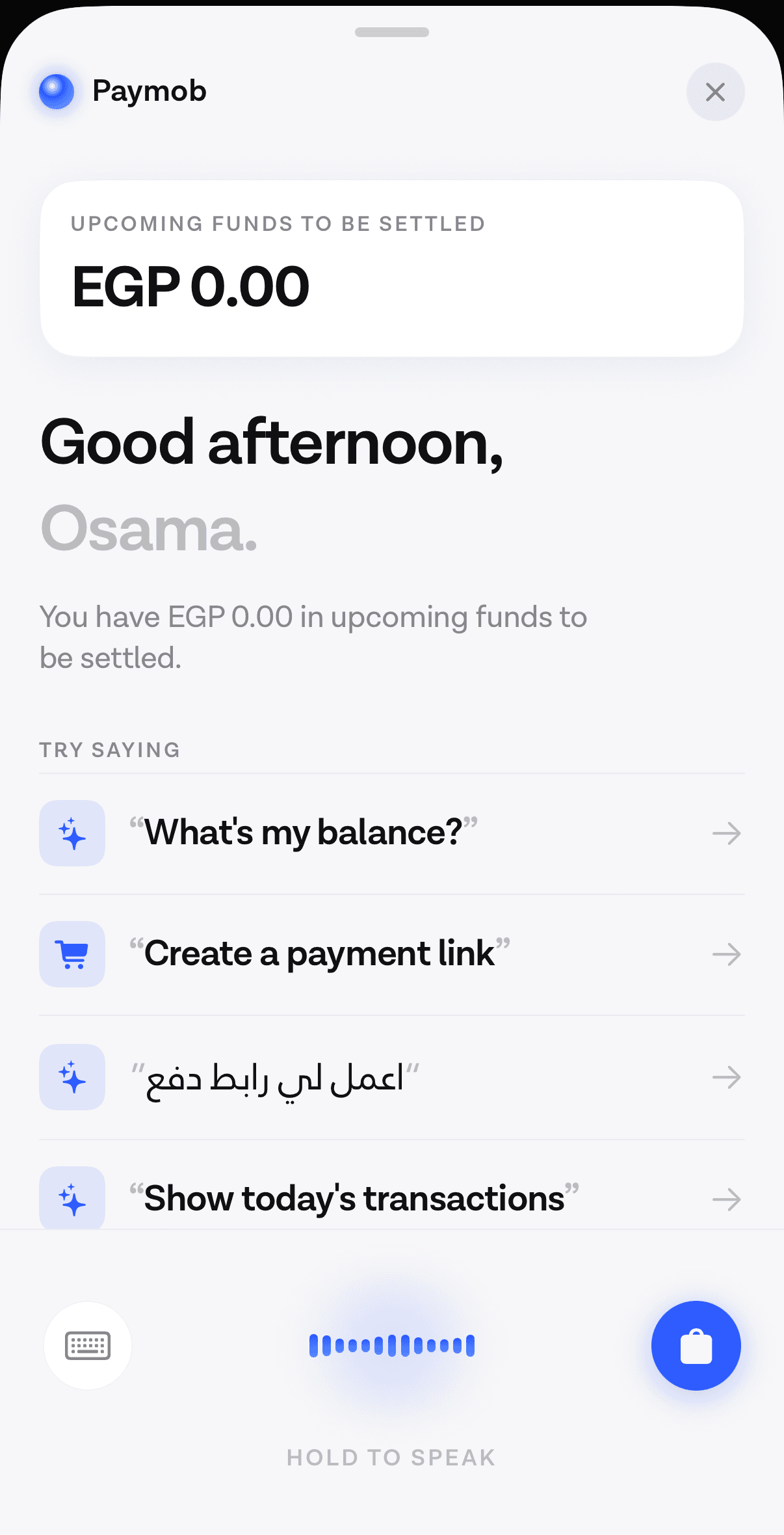
It calls tools. The tools are endpoints you nominated, with schemas you wrote. The model chooses which to call and with what arguments, which is the part Anthropic’s definition is pointing at, and it cannot reach anything you did not nominate. The mechanics of pointing an agent at the backend you already run are mostly schema design rather than model work: naming arguments the way a reader would, returning errors a model can recover from, and deciding which of your fifty endpoints are worth exposing at all. Most teams start with three or four read tools and add writes later, once they trust the reads.
It shows product UI. An answer arrives as one of your own views, chosen by the model and filled with real data, instead of a paragraph the user has to parse. On native this works because the agent emits a typed spec and the app draws a view it already shipped.
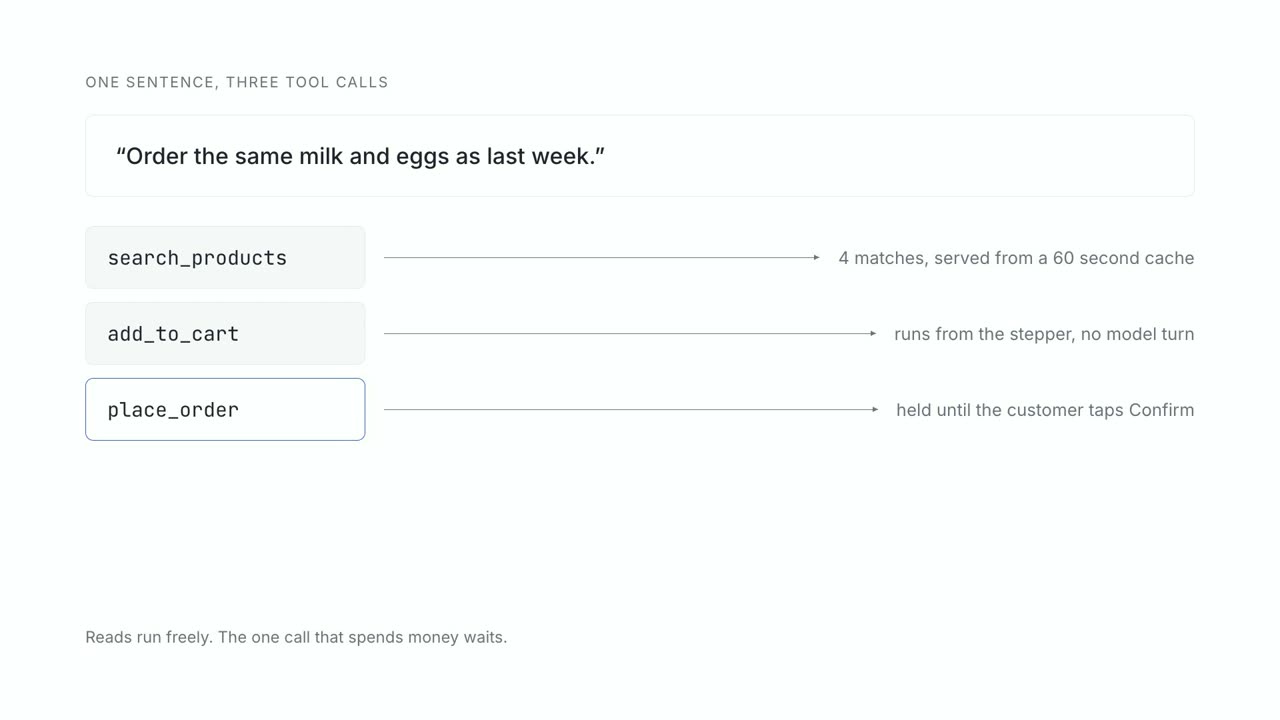
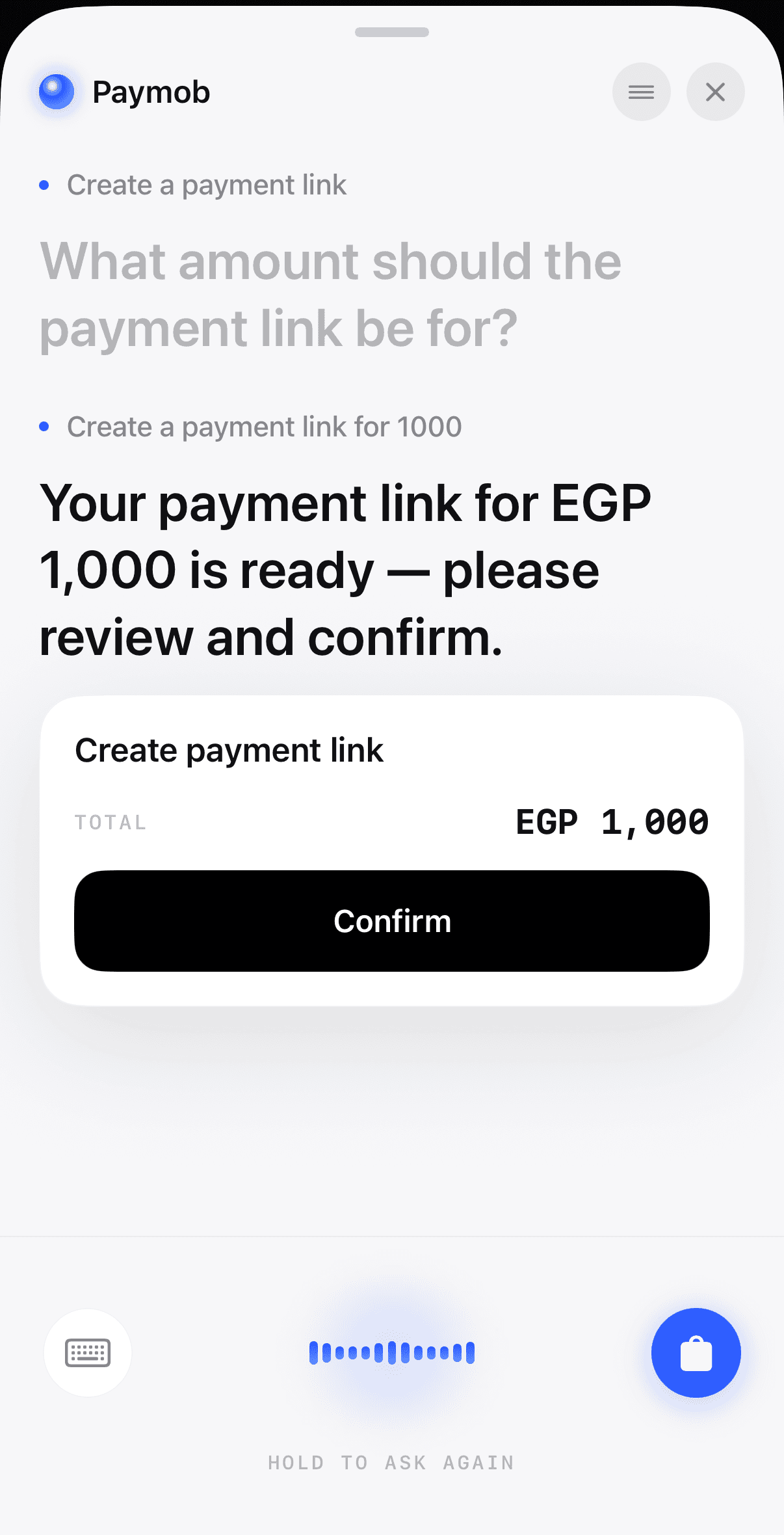
It asks before it writes. Every tool that changes something stops at a confirmation the model cannot skip, because it is a branch in your server code rather than an instruction in a prompt. This is also what the protocol layer expects: the Model Context Protocol’s specification states plainly that “hosts must obtain explicit user consent before invoking any tool”, and warns in the same section that “tools represent arbitrary code execution and must be treated with appropriate caution.”
What the agent is allowed to touch#
The useful way to specify an in-app agent is not by what it can do but by the boundary you put around it. Four things go in, and each one closes off a category of failure.
The token is the load-bearing one. If the agent holds a token scoped to the signed-in user and read live from your app on every request, then every question about what data it can see has the same answer as the equivalent question about your own UI. You are not building a second permission model, and a second permission model is where these projects usually go wrong.
The other three are each a way of making a class of bug impossible rather than unlikely. A named tool set means an endpoint you forgot to harden is not reachable, because it was never handed over. An unskippable confirm gate means a model that has been talked into something by text it read still cannot write, because the decision to write lives in your server and not in the conversation. A closed view catalogue means the worst rendering failure is a real view containing wrong text, rather than markup a model invented thirty seconds ago.
None of this makes the model correct. It makes the model’s mistakes bounded, which is a different and more achievable goal.
One turn, start to finish#
A user opens the assistant and asks a question. Your app hands the SDK the question and a fresh token for that user. The runtime decides a tool is needed and calls it against your backend, authenticated as that person. Your backend returns the same rows it would return to your own screens. The runtime writes a spoken answer and a typed spec, and the app draws a view from its catalogue.
The turn that changes something has one extra stop, at the confirm gate, and that stop is the whole of the safety story worth arguing about.
The category is early, and worth knowing that#
The honest framing is that this is not a settled product category. Stack Overflow’s 2025 Developer Survey was fielded to 49,009 people between 29 May and 23 June 2025, and each AI question was answered by a subset of them. Of the 33,662 who answered it, 84% are using or planning to use AI tools, up from 76% the year before. Of the 31,877 asked about agents, “a majority of developers (52%) either don’t use agents or stick to simpler AI tools, and a significant portion (38%) have no plans to adopt them”, with 14.1% using agents at work daily.
Trust is the harder number. Among the 33,244 who answered that question, “more developers actively distrust the accuracy of AI tools (46%) than trust it (33%)”, and positive sentiment fell from over 70% in 2023 and 2024 to 60%. The respondents were recruited through Stack Overflow’s own channels, so this is an opt-in sample rather than a representative one, and it skews toward people already engaged with the site.
Two things follow. The audience for this feature is more sceptical than the average consumer, which argues for shipping something that visibly completes a task rather than something that talks. And because a real fraction of your users will distrust it on arrival, the decision not to build one is a legitimate outcome of evaluating it honestly.
Anthropic reach the same conclusion from the engineering side, in the same post that defines the term: “when building applications with LLMs, we recommend finding the simplest solution possible, and only increasing complexity when needed. This might mean not building agentic systems at all.”
The rest of this cluster#
Nine posts sit under this one, and each answers a question this overview only names.
Telling an agent and a chatbot apart before you buy one is five questions to ask in a vendor demo, including the one about live account data that a retrieval bot cannot pass.
Why the assistants before 2023 failed explains what broke at the layer between words and actions, and what specifically replaced it.
An agent that finishes the task rather than describing it is the argument for the whole category, written as a comparison against your own navigation.
Reordering in three tool calls is the smallest complete feature, with the schemas written out, and it is where most teams should start.
The three retail tasks worth giving an agent covers whether your catalogue supports the case at all, which is a question about your data rather than about the model.
Which tasks belong on a spoken path is the honest framework, and it rules more things out than in.
Picking the mode for the task is the narrower version: speaking and typing reach the same agent, and the user’s situation decides which wins.
The boundary an SDK draws and the case for not building one at all are both linked above, in the sentences where they come up.
Common questions#
What is an AI agent in a mobile app?#
It is a feature inside your product that answers questions using live data from your backend and completes tasks by calling endpoints you exposed as tools. It authenticates as the signed-in user, draws your app’s own views, and stops for confirmation before writing anything.
How are AI agents different from chatbots?#
A chatbot turns text into text. An agent reads current state, calls tools, renders your product’s interface, and asks before it changes anything. The practical test is whether the user still has to go and do the task after the reply arrives.
Can an AI agent take actions inside an app, or only answer questions?#
It can act, but only through tools you nominated, and safely only if writes pass a confirmation your server enforces rather than one the prompt requests. Reads and writes are worth treating as two different features with two different risk profiles.
Do I need a backend to add an AI assistant to my app?#
You need somewhere the tools point. In practice that is the API your own app already calls, so most teams add no new backend and instead expose a subset of what exists. The work is choosing which endpoints become tools and writing schemas a model can use correctly.
Sources#
- Anthropic, Building effective agents, 19 December 2024. The page carries an editorial note that the tooling landscape it describes has changed since publication.
- LangChain, Agents, LangChain OSS documentation. Accessed 12 September 2026.
- Model Context Protocol, Specification, revision 2025-06-18, Security and Trust & Safety principles.
- Stack Overflow, 2025 Developer Survey, AI section and methodology, fielded 29 May to 23 June 2025, 49,009 responses from 177 countries. Respondents were recruited through Stack Overflow’s own channels.
Next
The quickstart wires the SDK into an app and runs one real turn against your own backend.
Add the SDK to a SwiftUI appThe rest of Agent basics
Open the clusterThe structural difference between something that answers and something that finishes the task, and how to tell which one a vendor is selling you.
- When voice actually works in an app, and when it doesn'tAn honest framework for deciding which tasks belong to a spoken path, which belong to text, and which should stay on the screen.8 min
- Voice or chat: picking the mode for the taskSpeaking and typing are two inputs to the same agent. The situation the user is in decides which one wins, and four of those situations are predictable.9 min
- Why pre-LLM assistants failed, and what changedAssistants before 2023 broke at the layer that turned words into actions. Three things replaced it: open intent, named tool calls, and a loop that checks first.10 min
- Agents in a shopping app: reorder, track, returnThe three retail tasks worth giving an agent, why reorder is first, and how to check whether your catalogue supports the case at all.7 min
- What an in-app agent SDK actually doesThe boundary between an agent SDK and your app, the five phases of a turn and what breaks in each, and why the write path is the part that decides the project.8 min
- In-app agents that finish the task instead of answeringAn assistant that describes where a setting lives competes with your own navigation. One that completes the request does not. What changed, and what to build.8 min
- Agent or chatbot: telling the two apart before you buyA support bot answers questions. An in-app agent finishes the task. Five questions that separate them in any vendor demo, and where a chatbot still wins.10 min
- Letting users reorder by voice in three tool callsRepeat purchase is the cheapest first agent feature to ship. Three tools carry it, only one of them writes, and a confirm card sits between the second and the third.6 min
- When not to put an AI agent in your appFour situations where an in-app agent loses to the interface you already have, and the test to run before you commit a quarter to building one.10 min
Elsewhere on the map
- How far you actually get in a day with an in-app agentA working spoken turn takes an afternoon. This is what those hours buy, what week two costs, and why the integration is not on the critical path at all.Integration9 min
- Does your agent work eight times out of eight?Average accuracy is the wrong number for a product. Run the same task eight times and count how often it worked every single time.Safety11 min
- Prompt injection when the agent can spend moneyIn a consumer app the untrusted text is your own user's data and the tools move their money, which makes filtering useless and structure the only real defence.Safety10 min