
What an in-app agent SDK actually does
The boundary between an agent SDK and your app, the five phases of a turn and what breaks in each, and why the write path is the part that decides the project.
About this article
An in-app agent SDK owns the microphone, the streaming, the conversation surface, the widget set and the confirm gate. Your app supplies a fresh auth token, a place to present from, and the list of operations the agent may call. The last of those is the only part that describes your product, and it is where the work is.
Ask what an agent SDK does and most answers describe a microphone. The microphone is the least interesting part. What an agent SDK actually does is hold a line: on one side, everything about talking to a model and drawing an answer, which is the same in every app; on the other, everything about your product, which is nobody else’s to know.
Where that line sits determines how much code you write. This post draws it, walks a single turn through the five phases the SDK actually models, and explains why the moment the agent can change something is the moment the architecture stops being a preference.
What sits on each side of the line#
The SDK side is a long list that is identical for every customer. Recording audio and handling permission prompts. Streaming frames upward and knowing when a sentence has ended. Cancelling a spoken answer the instant the user starts talking again. Drawing a stat, a list, a chart, a confirmation. Mirroring the whole layout for a right-to-left script. Recovering when a session token expires mid-turn.
The app side is short. A token, read fresh on every request rather than cached at launch. Some user metadata. A view controller to present from. Two callbacks for success and failure. And the list of operations the agent is allowed to call, which is the project.
The five methods, on iOS#
getToken() is called before every request rather than once, which is the detail most integrations get wrong. Return the current value from your auth layer each time. A token cached at app launch will expire, and the failure looks like a network problem rather than an auth one.
getMetaData() carries whatever your backend needs to scope the request. getViewController() hands over a presentation context. The two callbacks report a completed turn and a failure, and the failure one exists because something will fail and you want it in your own logging rather than ours.
One turn, five phases#
The SDK models a turn as five states, and each one needs something different on screen. In idle the assistant is open and waiting, which is where discoverability is won or lost. In listening it is capturing audio and deciding when you have stopped. transcribing is speech-to-text in flight, and it is its own phase because it can take long enough that a user who sees nothing assumes the thing has hung. Thinking is where an operation gets chosen, called, and stopped short of running if it writes. Speaking is the answer aloud, alongside the name of a widget shape from a closed set rather than any layout the model wrote.
Only transcribing is what a speech vendor’s accuracy figure describes. The interesting failures sit on either side of it. A pause mid-sentence gets read as the end of the sentence, and the user is cut off. Two operations whose names sound alike to a model produce a confident call to the wrong one. A missing argument produces an invented one. A twelve-row answer read aloud as a paragraph is technically correct and unusable. None of those show up in a word error rate.
This is why “99% transcription accuracy” is a reassuring number about the wrong thing. The question worth asking is how often the agent completes the task, measured over a fixed set of questions run repeatedly. An agent that succeeds eight times in ten is a feature that fails for one user in five.
Why the write path changes the architecture#
A read-only agent is a convenience feature. The moment it can settle a balance, send a payment link or change a delivery address, a transcript stops being consent.
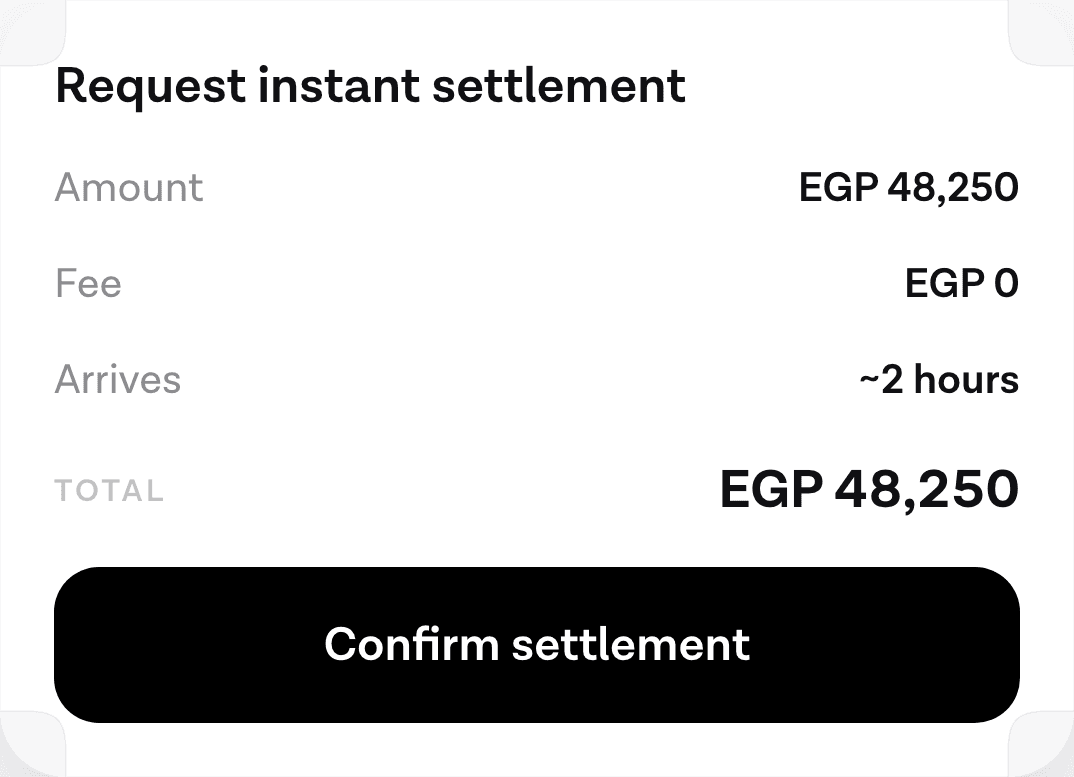
The gate is a two-request protocol. The turn that selects a write operation stops short of running it and returns a description of what it would do. The client draws that description as something a person can check. A second, separate call executes it after the user agrees, and approval is tiered so a low-risk action is a tap and a money-moving one is a biometric prompt.
That shape matters for a reason beyond safety. The Model Context Protocol specification states it directly in its trust and safety section: “Tools represent arbitrary code execution and must be treated with appropriate caution”, and descriptions of tool behaviour “should be considered untrusted, unless obtained from a trusted server”. An agent reading data from your backend is also reading text that can contain instructions. A closed set of operations and a human approval before any write is what keeps that from becoming an incident. How the tiering works in practice goes through which actions earn which gate.
The checkout case, specifically#
Payment flows are where this architecture gets argued about, so it is worth being careful with the evidence.
Baymard’s cart abandonment list puts the average at 70.22%, and the number is often quoted as a live measurement. It is not. It is “an average calculated based on 50 different studies”, last updated 22 September 2025, spanning nearly two decades. Treat it as a rough constant of the medium rather than a reading from this quarter.
The breakdown is the useful part. Excluding shoppers who were only browsing, Baymard puts mandatory account creation at 18% of abandonments and a checkout that is too long or too complex at 17%. Those two are structural. They are about how many things a person has to supply, not about whether they wanted the item.
An agent does not remove a payment step, and any claim that it lifts conversion by a specific percentage is a claim nobody can source. What it can do is collapse the supplying of information into one utterance and put the approval in a single card. Whether that changes your numbers is something you have to measure on your own funnel, which is the honest answer and the one the business case post works through properly.
How to tell a good one from a bad one#
Five questions separate an SDK you can ship from one that demos well.
Does it call for a token on every request, or once at setup? The second is a defect wearing a convenience feature, and you will find it the first time a token rotates mid-session.
What happens when it receives a response shape it does not recognise? An SDK with no defined fallback will crash or render nothing on the devices you cannot reach, which is exactly the population most likely to be running an old binary.
Can the user interrupt it mid-sentence, and what happens to the answer already streaming? Interruption is the difference between a conversation and a voicemail, and it is genuinely difficult, so it is a good proxy for how much of the hard work has been done.
Does it own a confirm step, or does it hand you a tool call and wish you luck? If the answer is the second, the safety layer is on your roadmap whether or not it is on your plan.
And can you theme it without forking it? A conversation surface that does not look like the rest of your app reads to users as a third-party widget, and they treat it with the suspicion that implies.
When a transcription API is the right answer#
If the output is text and a person reads it afterwards, use a speech API. Captioning, note-taking, call analytics and dictation into a field you already have are all cleanly solved by a transcript, and an agent runtime would be overhead.
The line is whether something has to happen as a result. A dictated note is finished when the words land. A request to move money is not finished until something moved, and everything between those two points is what an agent SDK exists for.
Plenty of products want both, and they are different integrations. A dictation field and an agent surface can live in the same app without either pretending to be the other.
What you still build#
Nothing above removes the tool layer. The SDK cannot know that your settle_balance operation requires a merchant id, that it fails differently on weekends, or that your users call it “cashing out”. Connecting an agent to the backend you already run covers the shape of that work, what a day of integration actually gets you is the schedule version, and what an in-app agent is allowed to touch in the first place is the question this whole boundary exists to answer.
Anthropic’s engineering note on agents is worth reading before you start, partly for the definition and partly for one line about where the effort actually goes: “We actually spent more time optimizing our tools than the overall prompt.” That has matched our experience on every tenant we have shipped.
Sources#
- Model Context Protocol, Specification, revision 2026-07-28. Accessed 12 September 2026.
- Baymard Institute, Cart abandonment rate statistics, last updated 22 September 2025. Accessed 12 September 2026.
- Anthropic, Building effective agents, 19 December 2024. Accessed 12 September 2026.
Next
The quickstart wires the SDK into an app and runs one real turn against your own backend.
Read the quickstartThe rest of Agent basics
Open the clusterThe structural difference between something that answers and something that finishes the task, and how to tell which one a vendor is selling you.
- What an in-app AI agent actually is, and what it can touchThree different things get called an AI agent in a mobile app. Here is the one that lives inside your product and acts through your own backend.11 min
- When voice actually works in an app, and when it doesn'tAn honest framework for deciding which tasks belong to a spoken path, which belong to text, and which should stay on the screen.8 min
- Voice or chat: picking the mode for the taskSpeaking and typing are two inputs to the same agent. The situation the user is in decides which one wins, and four of those situations are predictable.9 min
- Why pre-LLM assistants failed, and what changedAssistants before 2023 broke at the layer that turned words into actions. Three things replaced it: open intent, named tool calls, and a loop that checks first.10 min
- Agents in a shopping app: reorder, track, returnThe three retail tasks worth giving an agent, why reorder is first, and how to check whether your catalogue supports the case at all.7 min
- In-app agents that finish the task instead of answeringAn assistant that describes where a setting lives competes with your own navigation. One that completes the request does not. What changed, and what to build.8 min
- Agent or chatbot: telling the two apart before you buyA support bot answers questions. An in-app agent finishes the task. Five questions that separate them in any vendor demo, and where a chatbot still wins.10 min
- Letting users reorder by voice in three tool callsRepeat purchase is the cheapest first agent feature to ship. Three tools carry it, only one of them writes, and a confirm card sits between the second and the third.6 min
- When not to put an AI agent in your appFour situations where an in-app agent loses to the interface you already have, and the test to run before you commit a quarter to building one.10 min
Elsewhere on the map
- How to add an AI agent to a mobile app: the complete guideWhat an in-app agent is made of, what each of its five pieces costs to own, and the honest path from a first spoken turn to something you can hand to users.Business12 min
- Shipping UI without a release: the case for server-driven UIWhy mobile teams move layout decisions to the server, what it costs in versioning and coupling, and what changes when an agent is the thing choosing the shape.Render spec8 min
- The architecture of an in-app agent, for people who approve itEvery box in the system, who owns it, where the trust boundaries sit, and what changed between the intent-classification era and the one where a model chooses.Tools and MCP9 min